



The Windows 11 search box is slowly turning into a command line for everything. Microsoft’s new Insider builds, released on October 30, 2026, add result filters, inline action sliders, phone controls like calling and texting from search, and richer previews for files and web answers. The same update also adds quick settings controls for Xbox gaming mode, so you can toggle Bluetooth or Wi-Fi without leaving your game. Here is what is in the new builds and how the revamped search works.
New Builds and Channels
Microsoft shipped two main builds to Windows Insiders on October 30:
- Beta channel: Build 26220.9836.
- Experimental channel: Build 26340.9843.
For testers on specific versions, Microsoft also released Beta 26H1 Build 28020.3382, Experimental 26H1 Build 28120.3393 and Experimental Future Platforms Build 29698.1000. The search improvements are landing on the Experimental and Experimental 26H1 channels.
New Windows Search: Filters, Actions and Richer Results
The updated Windows Search experience began rolling out earlier in October, and these builds expand it with more ways to find things and take action directly from the search box.
Inline actions
You can now adjust volume, screen brightness and cursor size with inline sliders right in the search results. Actions are more clearly labeled, and suggested actions surface more things you can do without opening Settings.
Result filters
Scroll past the first results and you can filter by Files & Folders, Settings, Actions and more. The filter view also carries through to web results.
Richer results
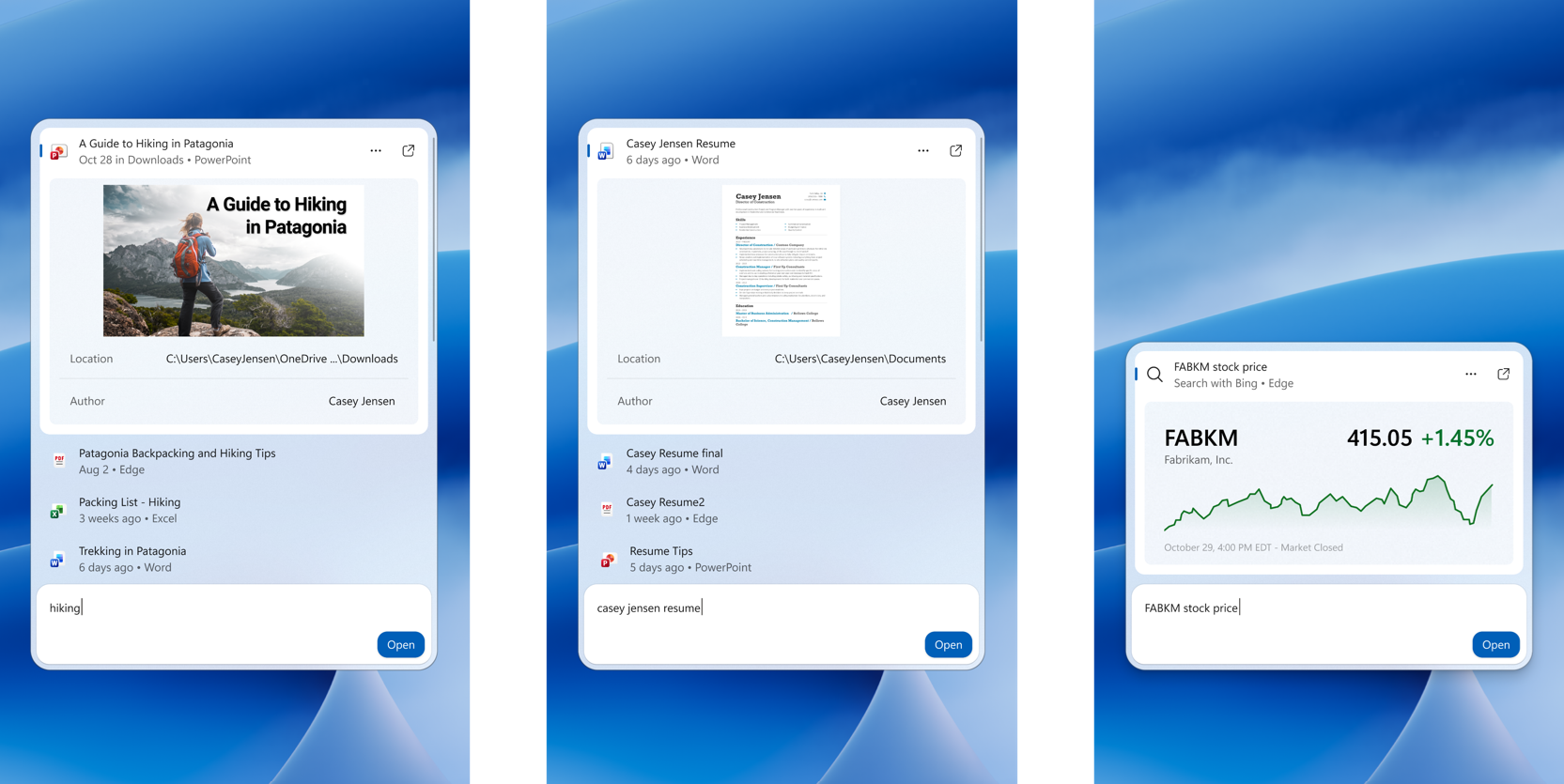
Search results now preview files and show details like last modified date, location and author. The box also pulls in web answers for weather, stocks and facts, and it can surface apps and games from the Microsoft Store. Like web results, Store app results can be toggled off in Settings, then Privacy & security, then Search.
Feedback controls
Right-click any result or suggestion to give it a thumbs up or thumbs down, which trains the ranking over time. You can also remove items from the initial search view before you type, and Microsoft has made small polish improvements to the look and feel of the search panel based on tester feedback.
Phone Actions From the Search Box
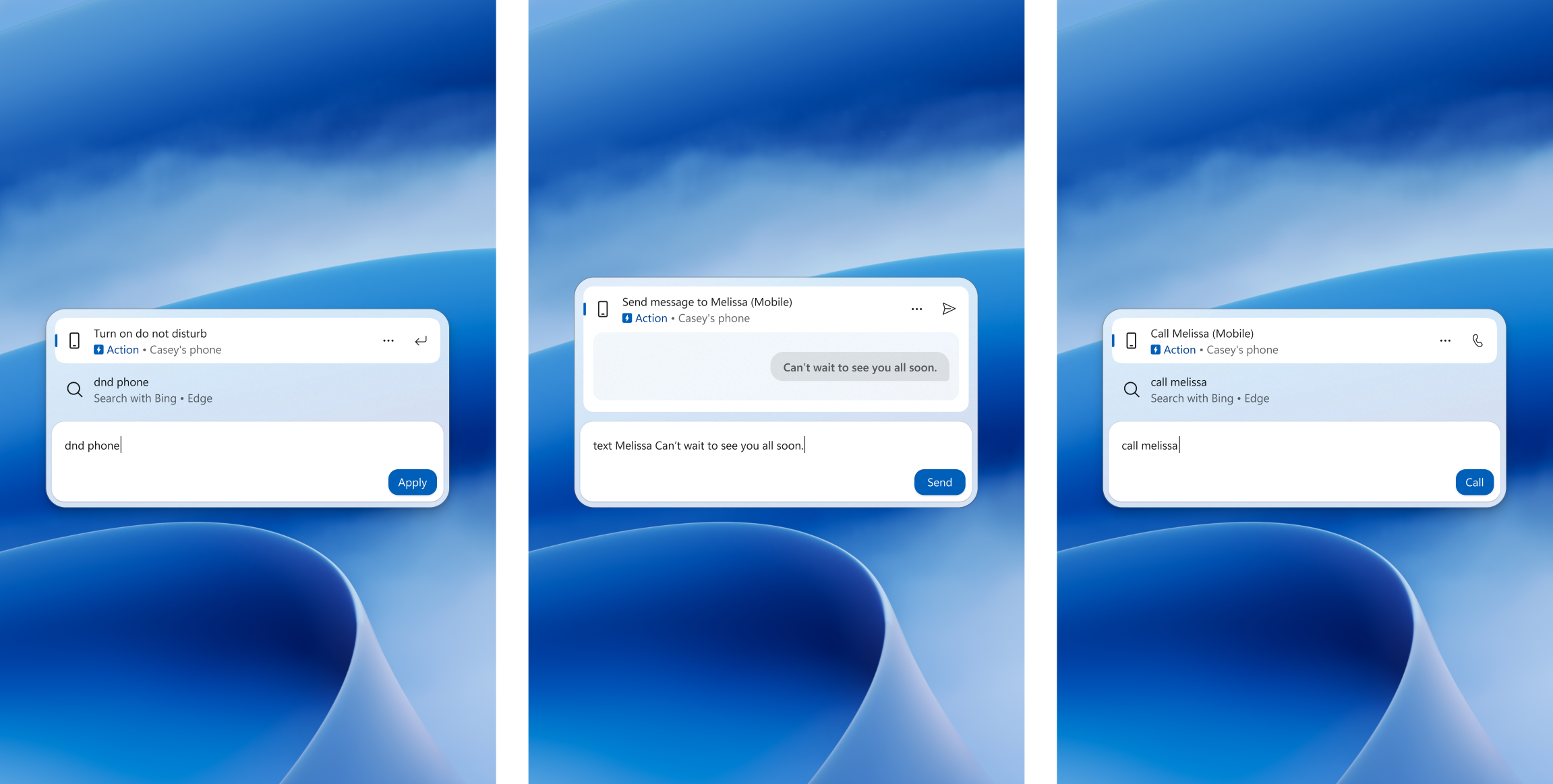
If you have a supported phone connected through Phone Link, the search box can now place calls, send text messages and toggle the phone’s Do Not Disturb mode. Android support is available now, with iPhone support coming early next year.
This is a small feature with big daily potential. Searching for a contact and calling them without opening the Phone Link app removes several steps from something people do constantly. It also pushes Windows 11 closer to the phone and PC integration that Apple users get with macOS and iOS.
Xbox Gaming Mode Quick Settings
The second headline change in these builds is for Xbox gaming mode. The new quick settings let you control Bluetooth, Wi-Fi and power settings without having to exit gaming mode, which is the kind of change handheld PC users have been asking for since Windows gaming handhelds became a category.
For anyone playing on devices like the ROG Ally or Legion Go, dropping out of a game just to reconnect a controller or change a power profile has been a constant irritation. These shortcuts keep the session running while you fix the setting.
Other Changes: Private Feedback for Businesses
Microsoft is also introducing a new Intune policy for commercial customers. When it is enabled, feedback submitted through Feedback Hub by users in a tenant stays private: it cannot be posted to the public community or shared outside the organisation, and it is only accessible to Microsoft and users within the same organisation. That closes a long-standing gap where enterprise bug reports could leak details about internal deployments.
Tips for Trying This Build
- Join the right channel. The search features are in the Experimental and Experimental 26H1 builds, not the regular Beta.
- Set up Phone Link first. Phone actions only appear once a supported phone is connected; Android works today and iPhone support is expected early next year.
- Review your Search privacy toggles. Store app and web results can be turned off in Settings, then Privacy & security, then Search.
- Train the results. The thumbs up and thumbs down controls are real ranking signals now, so use them on good and bad results.
- Know the current limitation. The new search opens at the bottom center of the screen. Microsoft says work is underway to adapt it to different taskbar positions and to Start menu search.
Why This Search Revamp Matters
This is not a one-off tweak. Microsoft published a blog post earlier in October titled “From searching to doing”, framing the redesign around turning the search box into a place where tasks get finished instead of just found. The October 30 builds are the second major drop in that effort.
The old Windows search was mostly an app launcher with some web results bolted on. The new one acts more like a command surface. Adjusting brightness or volume with an inline slider, replying to a text message or checking a stock price without opening a browser are all small wins that add up over a working day.
The thumbs up and thumbs down controls are the part that will shape the feature long term. Search ranking is only as good as its feedback loop, and letting users train results inline is how this improves instead of staying static.
How to Join the Windows Insider Program
These builds are not on stable Windows 11 yet. To try them:
- Open Settings, then Windows Update, then Windows Insider Program.
- Sign in with a Microsoft account and pick the Experimental channel for the new search features.
- Install the offered build and reboot.
- Remember that Insider builds are previews. Do not put one on a machine you rely on for deadline work, and keep a backup before switching channels.
FAQ
What is new in Windows 11 Build 26340.9843?
Experimental Build 26340.9843 expands the new Windows Search with inline action sliders, result filters, richer file and web results, thumbs up and thumbs down feedback controls, and phone actions like calling and texting through Phone Link.
Can Windows 11 search make phone calls now?
Yes. With a supported phone connected through Phone Link, you can place calls, send texts and toggle Do Not Disturb directly from the search box. Android phones are supported now, and iPhone support is coming early next year.
What are the Xbox gaming mode shortcuts in the new Windows 11 build?
The latest Insider builds add quick settings for Xbox gaming mode that let you control Bluetooth, Wi-Fi and power settings without leaving the game.
How do I get the new Windows Search experience?
Join the Windows Insider Program’s Experimental channel and install Build 26340.9843 or the Experimental 26H1 build. Note that the new search currently opens at the bottom center of the screen, with other taskbar positions still in progress.
