


Close Menu
GeekPlanet

    Subscribe to Updates

    Be Geeky and subscribe to GeekPlanet for Technology, Security and Gadgets.

    What's Hot

    Must-Try Android 16 Desktop Features for Power Users

    Common Cyber Traps to Avoid While Browsing in India

    The Hottest Smartphone Trends Sweeping the Indian Market

    Facebook X (Twitter) Instagram
    • Privacy & Policy
    • Terms & Conditions
    • Contact US
    Facebook X (Twitter) Instagram YouTube
    GeekPlanetGeekPlanet
    AtlasVpn
    • Home
    • Gadgets
    • Entertainment
    • Cyber Security
    • How To’s & Guides
    • Reviews
    • Python
    GeekPlanet
    Home - Python - Data Structures and Their Functions in Python
    Python

    Data Structures and Their Functions in Python

    Geek PlanetBy Geek PlanetUpdated:January 10, 20263 Mins Read
    Facebook Twitter Pinterest LinkedIn Telegram Tumblr Email
    Share
    Facebook Twitter LinkedIn Pinterest Email

    Data Structures and Their Functions in Python

    Introduction: Data structures are fundamental components of programming languages like Python. They serve as the building blocks for organizing, storing, and manipulating data efficiently. In Python, a versatile and widely-used programming language, various data structures are available, each with its own unique characteristics and functions. This article explores some of the most common data structures in Python and delves into their functions, use cases, and advantages.

    1. Lists:

    Lists in Python are one of the most versatile and frequently used data structures. They are ordered collections of elements and are defined using square brackets. Lists can contain elements of different data types, making them highly flexible.

    Functions:

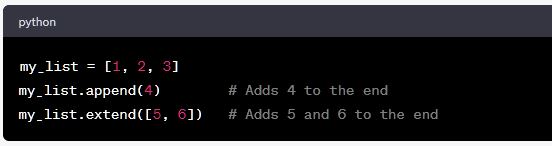
    • Appending and Extending: Lists can be modified by adding elements to the end. The append() method adds a single element, while the extend() method adds multiple elements.
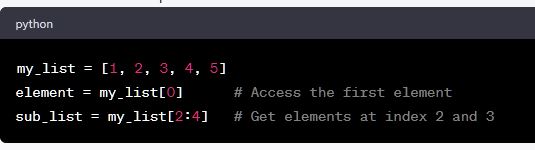
    Indexing and Slicing: You can access elements of a list using their index, and you can also slice a list to retrieve a portion of it.
    Searching and Counting: Python lists provide methods like index() and count() to find the index of a specific element and count occurrences of an element, respectively.

    Sorting and Reversing: Lists can be sorted using the sort() method, and their order can be reversed using reverse().

    2. Tuples:

    Tuples are similar to lists but with a crucial difference: they are immutable. This means once you create a tuple, you cannot change its elements. Tuples are defined using parentheses.

    Functions:

    • Packing and Unpacking: You can create tuples by packing multiple values together and unpack them into individual variables.
    • Accessing Elements: You can access tuple elements using indexing, just like in lists.
    • Immutability: Since tuples are immutable, they are suitable for storing data that should not change during program execution.
    • Tuple Concatenation and Repetition: You can concatenate tuples using the + operator and repeat them using the * operator.
    • Set Operations: Sets support various set operations like union, intersection, and difference.
    • Checking Membership: You can check if an element is present in a set using the in keyword.
    • Set Comprehensions: Like list comprehensions, Python also supports set comprehensions for creating sets in a concise way.

    4. Dictionaries:

    Dictionaries in Python are collections of key-value pairs. They are unordered, and keys must be unique. Dictionaries are defined using curly braces {} or the dict() constructor.

    Functions:

    • Adding and Updating Elements: You can add or update elements in a dictionary by assigning values to keys.
    • Accessing Elements: You can access dictionary values using their keys.
    • Removing Elements: You can remove elements from a dictionary using the pop() method or the del statement.
    • Iterating Over Dictionaries: You can iterate over keys, values, or key-value pairs in a dictionary using loops.
    data structure data structures and function in python python
    Share. Facebook Twitter Pinterest LinkedIn Tumblr Email
    Geek Planet
    • Website
    • Facebook
    • X (Twitter)
    • Instagram

    Hello, tech enthusiasts! I'm Devender, your guide through the ever-evolving world of technology. With a passion for innovation and a knack for breaking down complex concepts into digestible bits, I'm here to help you navigate the digital frontier.

    Related Posts

    Best Python Developer Tools 2026: uv, Ruff, ty, and More

    84% of Developers Use AI Coding Tools But Only 29% Trust the Output

    AI Coding Tools Are Reshaping Developer Jobs in 2026

    Python 3.15 Hits Feature Freeze With New Sentinel Built-in

    Python 3.14.6 Released With Template Strings and Free Threading

    Ollama Raises $65M Series B, Now Used by 8.9M Developers Monthly

    Leave A Reply Cancel Reply

    Top Posts

    Must-Try Android 16 Desktop Features for Power Users

    Data Structures and Their Functions in Python

    How do I edit a sent message on WhatsApp?

    Don't Miss

    Must-Try Android 16 Desktop Features for Power Users

    Latest updates on android and why Indian users need to know about the changes coming in 2026.

    Common Cyber Traps to Avoid While Browsing in India

    The Hottest Smartphone Trends Sweeping the Indian Market

    The Future of Artificial Intelligence: Trends Impacting India

    Stay In Touch
    • Facebook
    • YouTube
    • TikTok
    • WhatsApp
    • Twitter
    • Instagram
    TPS4
    Most Popular

    Must-Try Android 16 Desktop Features for Power Users

    Data Structures and Their Functions in Python

    How do I edit a sent message on WhatsApp?

    Our Picks

    Must-Try Android 16 Desktop Features for Power Users

    Common Cyber Traps to Avoid While Browsing in India

    The Hottest Smartphone Trends Sweeping the Indian Market

    Subscribe to Updates

    Be Geeky and subscribe to GeekPlanet for Technology, Security and Gadgets.

    Facebook X (Twitter) Instagram Pinterest
    © 2026 GeekPlanet.in Managed by MyAdsMantra Global.

    Type above and press Enter to search. Press Esc to cancel.

    Ad Blocker Enabled!
    Ad Blocker Enabled!
    GeekPlanet is a safe place for every tech lover and is made possible by displaying online advertisements to our visitors. Please support us by disabling your Ad Blocker.