



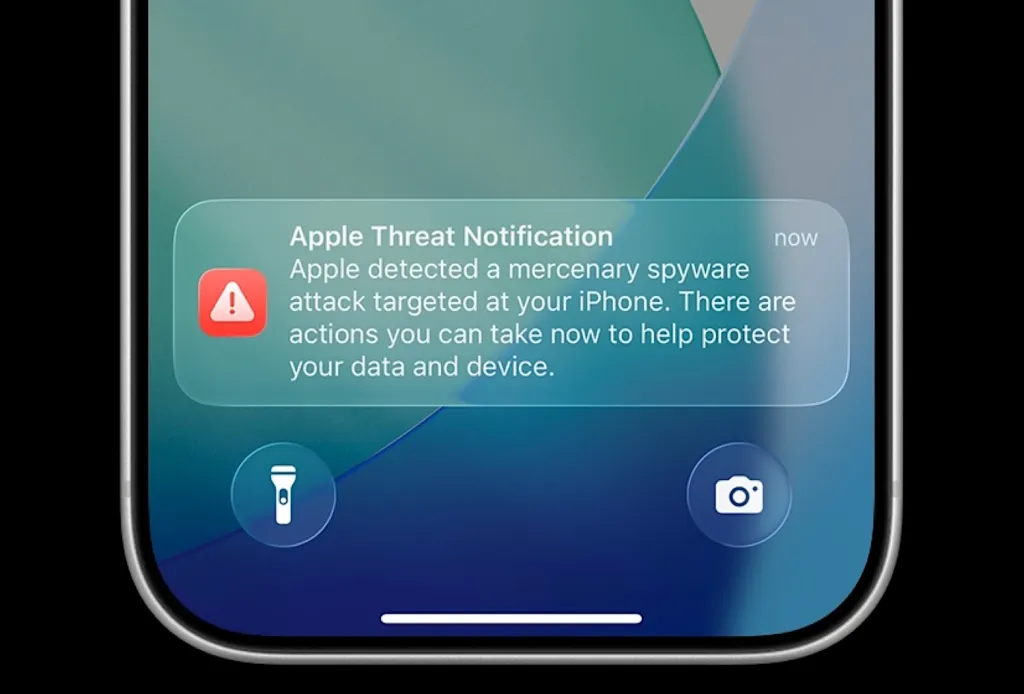
Apple has sent a fresh wave of spyware warnings, and this time German politicians are among the targets. Germany’s federal cybersecurity office confirmed over the weekend that members of the Bundestag and other public figures received Apple threat notifications saying their iPhones may have been hacked. Here is what happened, how these attacks work, and what you should do if Apple ever sends you the same alert.
What Happened
Germany’s federal cybersecurity office, the BSI, said in a note over the weekend that it had become aware that members of the Bundestag, the German parliament, along with other unnamed notable individuals, had received warnings from Apple that they may have been targeted by cyberattacks.
According to the Financial Times, German government spokesperson Stefan Kornelius said the government in Berlin was “taking the incident and the warning very seriously”. The government did not say who was targeted, including whether Chancellor Friedrich Merz was among them.
Germany is not alone in this round. Radwan Mortada, a Beirut-based filmmaker, said on X that he received a new threat notification warning that Apple had detected “another attack against your device”, after an earlier spyware attack targeted him in 2021. Per the notice he received, Apple said its latest batch of threat notifications went out to users in 99 countries.

How These Spyware Attacks Work
The spyware behind these warnings is often described as “mercenary spyware”. Governments rarely build these tools themselves. They buy them from private vendors, the best known being Israel’s NSO Group, which sells the controversial Pegasus spyware.
The scary part is how little the victim has to do. These attacks frequently rely on zero-click exploits, which can compromise a phone almost invisibly. The victim does not need to click a link, open a file or answer a message. The exploit does the work on its own, and once inside, the spyware can steal messages, location data, call records and other sensitive information.
Some key points from the current situation:
- Apple does not attribute attacks to specific governments and does not say whether a device has actually been compromised.
- Because of that, the BSI says anyone who receives an Apple threat notification “should therefore assume that their device may have been compromised.”
- It remains unclear who is behind this latest round, or which government orchestrated the targeting.
- A Citizen Lab report in October 2026 found that governments are abusing online advertising systems to deliver zero-click spyware to targets.
- Germany’s own federal criminal police agency, the BKA, reportedly bought access to Pegasus back in 2019, which shows how tangled the buyers and targets can be.
What To Do If You Get an Apple Threat Notification
Apple has been sending these notifications since 2021 to people it believes may have been targeted by state-sponsored attackers. If one lands on your lock screen, treat it as an emergency, not a glitch.
- Update iOS immediately. Many of these exploits are patched in the latest iOS version. Install every pending update before anything else.
- Turn on Lockdown Mode. Go to Settings, then Privacy & Security, then Lockdown Mode. It strips out features attackers have abused in the past, including certain message attachment types and web technologies.
- Restart your phone. Some zero-click implants do not survive a reboot. It is a small step that can disrupt the attack.
- Change passwords from a different device. If the phone is compromised, typing new passwords on it just hands them over. Use a clean laptop instead.
- Move to hardware security keys. For email and banking, switch to physical security keys for two-factor authentication instead of SMS or app codes.
- Get expert help. Organisations like Access Now and Citizen Lab run helplines for people targeted by spyware, and they can do a deeper forensic check.
- Do not factory reset before getting help. The evidence of the attack is valuable, especially for journalists and activists. Consult a security professional first.
Why Ordinary iPhone Users Should Care
It is tempting to read these headlines and think spyware is only a problem for politicians and filmmakers. Three reasons to pay attention anyway.
- The tools leak. Exploits built for governments end up in criminal hands more often than anyone admits.
- The notification batch reached 99 countries. This is not a single-country event. Anyone in a sensitive profession, journalism, legal work, activism or politics can land on a target list.
- Good hygiene helps everyone. Keeping iOS updated and Lockdown Mode available is the same advice that protects you from ordinary malware and phishing.
For most people, the practical takeaway is simple: when Apple says update, update. The company pushes these fixes precisely because the window between exploit and patch is the only advantage defenders get.
A Short History of Mercenary Spyware
This is not the first time governments have been caught using bought hacking tools against their own people, or against people across borders.
- NSO Group’s Pegasus was at the centre of the 2021 Pegasus Project revelations, which identified journalists, activists and politicians across dozens of countries as potential targets.
- Apple began sending state-sponsored attack notifications in November 2021 and has issued them periodically ever since, sometimes to hundreds of users at a time.
- Germany’s own BKA reportedly purchased access to Pegasus in 2019, a fact that makes this week’s warning against German lawmakers especially uncomfortable.
- In October 2026, Citizen Lab researchers reported that governments are now abusing online advertising infrastructure to deliver zero-click spyware, meaning a malicious ad can be the attack vector.
The pattern across these cases is the same: the tools are built by private companies, sold to governments with weak oversight, and eventually used far beyond their stated purpose of serious crime and terrorism investigations.
Lockdown Mode: What You Give Up
Lockdown Mode is the single strongest protection Apple offers against this class of attack, and it is worth knowing the trade-offs before enabling it permanently.
- What it blocks: most message attachment types other than images, certain web technologies in Safari, shared albums in Photos, incoming FaceTime calls from unknown numbers, and wired connections to computers or accessories when the device is locked.
- What still works: phone calls, normal texting, most apps, and standard browsing on many sites.
- Who should use it: journalists, lawyers, activists, politicians and anyone who handles sensitive material on their phone.
- Who can skip it: everyday users who are not plausible targets of a state-level actor. For them, keeping iOS updated is the realistic defence.
If you received a threat notification, the trade-offs stop mattering. Turn Lockdown Mode on, keep it on until a security professional says otherwise, and use a separate clean device for anything sensitive in the meantime.
FAQ
What is an Apple threat notification?
It is a warning Apple sends to users it believes may have been targeted by state-sponsored spyware attacks. Apple has sent these notifications since 2021, and the latest batch reached users in 99 countries.
Can an iPhone really be hacked without clicking anything?
Yes. Mercenary spyware like Pegasus often uses zero-click exploits that can compromise a device without the victim tapping a link or opening a file. This is why the BSI says anyone receiving the warning should assume their device may be compromised.
What is Lockdown Mode on iPhone?
Lockdown Mode is an optional high-security setting in iOS found under Privacy and Security. It limits web technologies, message attachments and other features that spyware has exploited in the past. It is designed for people who may be targeted by state-level attacks.
How do I know if my iPhone has spyware?
There is no simple home check. The clearest signal is an official Apple threat notification. If you get one, update iOS, enable Lockdown Mode, and contact a specialist organisation like Access Now or Citizen Lab before resetting the device.
