


Close Menu
GeekPlanet

    Subscribe to Updates

    Be Geeky and subscribe to GeekPlanet for Technology, Security and Gadgets.

    What's Hot

    Tips to Secure Your Online Banking in India

    Android Privacy Controls You Should Enable Right Now

    Upcoming Budget Smartwatches in India This Quarter

    Facebook X (Twitter) Instagram
    • Privacy & Policy
    • Terms & Conditions
    • Contact US
    Facebook X (Twitter) Instagram YouTube
    GeekPlanetGeekPlanet
    AtlasVpn
    • Home
    • Gadgets
    • Entertainment
    • Cyber Security
    • How To’s & Guides
    • Reviews
    • Python
    GeekPlanet
    Home - facebook-tips - how to download a fb video to computer – The easiest way to download a Facebook video
    facebook-tips

    how to download a fb video to computer – The easiest way to download a Facebook video

    Geek PlanetBy Geek PlanetUpdated:October 10, 20231 Min Read
    Facebook Twitter Pinterest LinkedIn Telegram Tumblr Email
    Share
    Facebook Twitter LinkedIn Pinterest Email

    Watching Facebook video has its own fun, but if you like a video and want to download it, then this task seems a bit difficult, but there is a little trick. With this you can download Facebook Video in a jiffy –

    • There is a very easy way to download Facebook Video on computer.
    • Right click on any Facebook video you want to download and
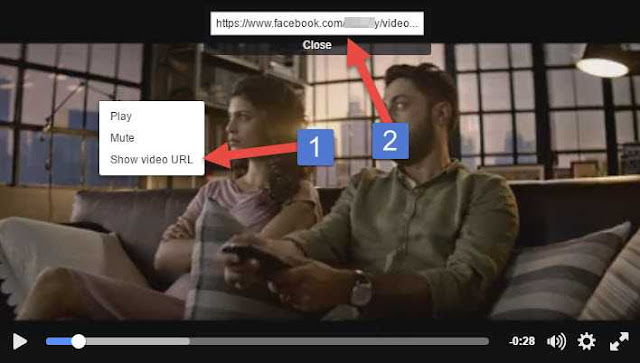
    • Right click on it and click on Show video URL, you will see the video URL above, copy it from the keyboard.
    • Now second step, paste this copied video URL in your Chrome browser.
    • After pasting, type m instead of www in the video URL and enter.
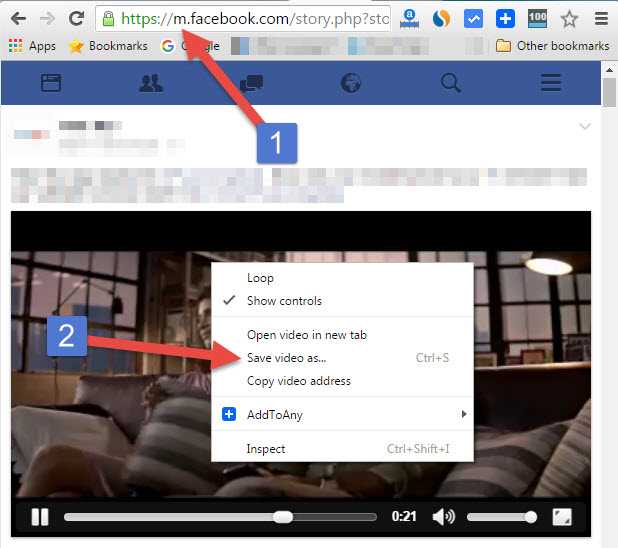
    • After this, Facebook mobile version will open on your desktop.
    • Now right click on the video and click on Save Vedio as.. and save the video wherever you want, you will be able to save this video in Mp4 format.

    Facebook Video Kaise Download Kare in Hindi, Learn How to Save Facebook Video on Computer in Hindi, Download Facebook Videos using Chrome, A Simple Way to Download Facebook Videos, Trick Download Facebook Videos, Download Facebook Videos without any Software, Download Facebook Videos

    Share. Facebook Twitter Pinterest LinkedIn Tumblr Email
    Geek Planet
    • Website
    • Facebook
    • X (Twitter)
    • Instagram

    Hello, tech enthusiasts! I'm Devender, your guide through the ever-evolving world of technology. With a passion for innovation and a knack for breaking down complex concepts into digestible bits, I'm here to help you navigate the digital frontier.

    Related Posts

    How to Use Facebook Tags Review- Does anyone tag you on Facebook?

    Best Text Art Generator Tool for facebook – Create amazing text art and impress your friends

    Leave A Reply Cancel Reply

    Top Posts

    Tips to Secure Your Online Banking in India

    Data Structures and Their Functions in Python

    How do I edit a sent message on WhatsApp?

    Don't Miss

    Tips to Secure Your Online Banking in India

    Follow these expert tips to keep your bank accounts safe from hackers.

    Android Privacy Controls You Should Enable Right Now

    Upcoming Budget Smartwatches in India This Quarter

    Generative AI Tools Helping Indian Startups Scale Fast

    Stay In Touch
    • Facebook
    • YouTube
    • TikTok
    • WhatsApp
    • Twitter
    • Instagram
    TPS4
    Most Popular

    Tips to Secure Your Online Banking in India

    Data Structures and Their Functions in Python

    How do I edit a sent message on WhatsApp?

    Our Picks

    Tips to Secure Your Online Banking in India

    Android Privacy Controls You Should Enable Right Now

    Upcoming Budget Smartwatches in India This Quarter

    Subscribe to Updates

    Be Geeky and subscribe to GeekPlanet for Technology, Security and Gadgets.

    Facebook X (Twitter) Instagram Pinterest
    © 2026 GeekPlanet.in Managed by MyAdsMantra Global.

    Type above and press Enter to search. Press Esc to cancel.

    Ad Blocker Enabled!
    Ad Blocker Enabled!
    GeekPlanet is a safe place for every tech lover and is made possible by displaying online advertisements to our visitors. Please support us by disabling your Ad Blocker.