



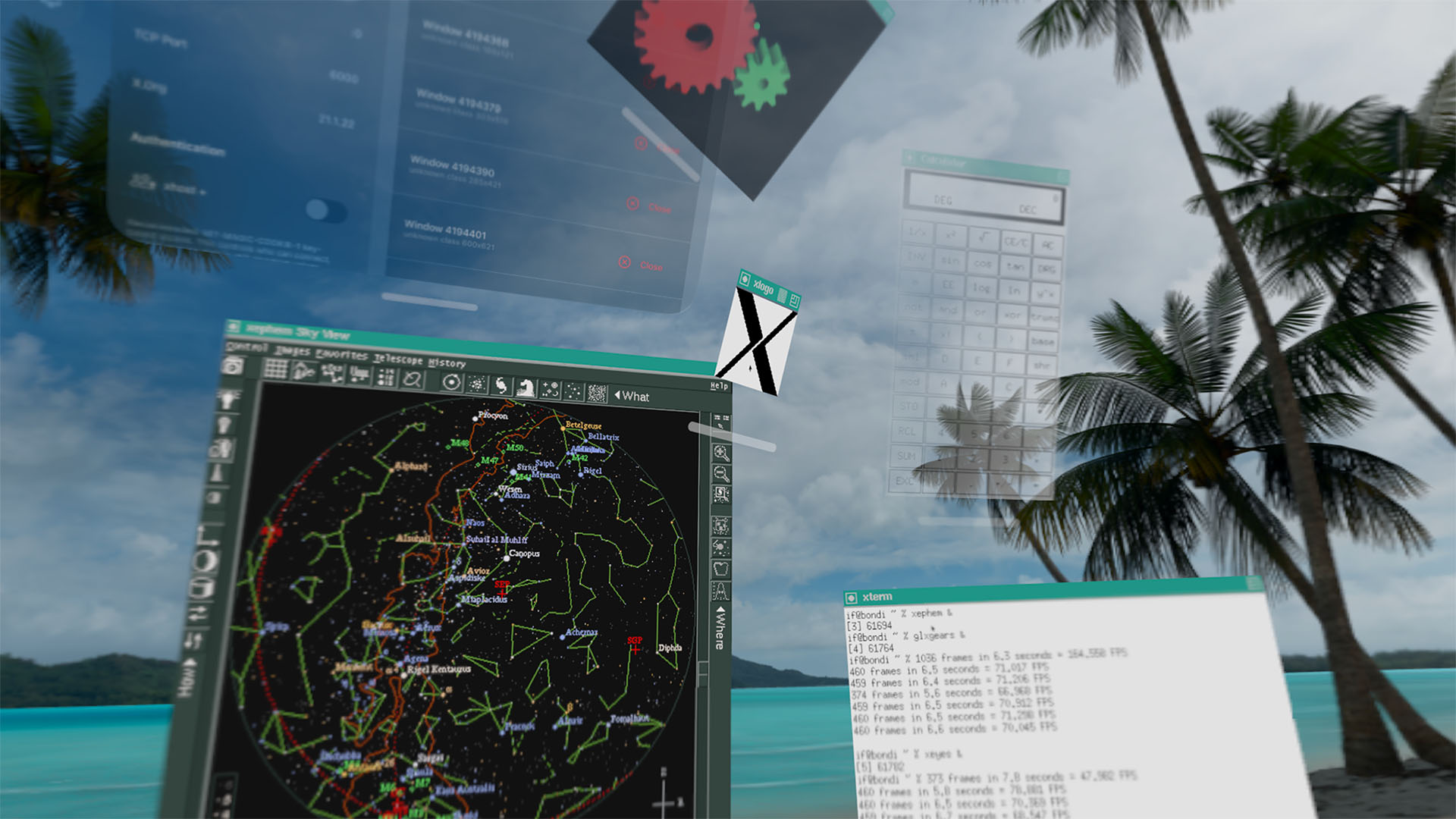
Developer Ian Finder has built UHF X11, a visionOS app that turns Apple Vision Pro into a full X11 display server. The app lets you connect remote machines and run X Window System clients that appear as native spatial windows you can position anywhere in your physical space.
How UHF X11 Works
Once installed on Vision Pro, UHF X11 sets up a standard X11 display server. Remote machines connect using the familiar DISPLAY environment variable:
setenv DISPLAY VISOR.LOCAL:0
From there, any X11 client, including xterm, xclock, xcalc, twm, and xlogo, will render its top-level window as a native visionOS spatial window. Each window can be positioned independently in your physical environment.
The app handles X authority cookies automatically. It generates MIT-MAGIC-COOKIE-1 tokens on the Vision Pro and copies them to client machines for authenticated connections, just like any standard X11 setup over TCP.
Rootless Spatial Windows
Unlike traditional X11 setups where all windows live inside a single desktop environment, UHF X11 runs rootless. Every X11 top-level window opens as its own visionOS window. You can scatter an xterm here, an xclock there, and an xcalc somewhere else, all floating in your living room or office space.
The X framebuffer content is rendered at native resolution with nearest-neighbor scaling for smaller surfaces. This means pixel-art applications and bitmap-font terminals look exactly as they should, without blurry bilinear filtering.
CRT Effects for Nostalgia
For those who want the full retro experience, UHF X11 includes CRT scanline presets, phosphor mask overlays, glow effects, and vignette. These effects recreate the look of vintage CRT displays, which is fitting given that many X11 applications were designed for exactly those screens.
Experimental 3D Support
The app includes experimental indirect GLX support, meaning OpenGL clients can potentially use GLX rendering over X11 to draw 3D content. Finder notes that “compatibility varies, as it did in the 2000s,” which is an honest assessment. GLX support was always finicky even on native Linux desktops.
The tagline “3D in 2D in 3D” captures the irony of running a 2D graphics protocol inside a 3D spatial computing environment that itself renders to a stereoscopic display.
Custom Fonts and Theming
UHF X11 ships with core X11 bitmap fonts and lets users import custom bitmap font directories from visionOS file system folders. This is essential because many X11 applications, especially older ones, rely on specific bitmap fonts that are not part of modern font rendering stacks.
External Client Connections
The app accepts connections from any trusted machine over standard X11 TCP networking. This means you can run UHF X11 on Vision Pro and then SSH into a remote Linux server, set DISPLAY to point at the Vision Pro, and run graphical applications that appear floating in your space. It is a practical tool for developers and sysadmins who work with X11 applications regularly.
The Nostalgia Factor
Finder’s project page on lispm.net leans heavily into retro computing aesthetics, with VT terminal-style rendering, Lisp Machine references, and the disclaimer “NO FREE LISP MACHINES.” The app description reads like a product from 1988 reimagined for 2026 spatial computing hardware.
UHF X11 is available now on the App Store for Apple Vision Pro. The app is free and open source under the MIT license.
