


Close Menu
GeekPlanet

    Subscribe to Updates

    Be Geeky and subscribe to GeekPlanet for Technology, Security and Gadgets.

    What's Hot

    Android 16 Desktop Mode: New Features on Pixel and Samsung Phones

    Cyber Security Threats 2026: How Indian Users Should Protect Data

    Mobile Phones Market India August 2026: Best Phones Under Rs 30,000

    Facebook X (Twitter) Instagram
    • Privacy & Policy
    • Terms & Conditions
    • Contact US
    Facebook X (Twitter) Instagram YouTube
    GeekPlanetGeekPlanet
    AtlasVpn
    • Home
    • Gadgets
    • Entertainment
    • Cyber Security
    • How To’s & Guides
    • Reviews
    • Python
    GeekPlanet
    Home - Gadgets - UHF X11 Turns Apple Vision Pro Into an X11 Display Server
    Gadgets

    UHF X11 Turns Apple Vision Pro Into an X11 Display Server

    Geek PlanetBy Geek Planet3 Mins Read
    Facebook Twitter Pinterest LinkedIn Telegram Tumblr Email
    UHF X11 X11 display server running on Apple Vision Pro visionOS
    Share
    Facebook Twitter LinkedIn Pinterest Email
    Apple Vision Pro spatial computing with X11 windows floating in space

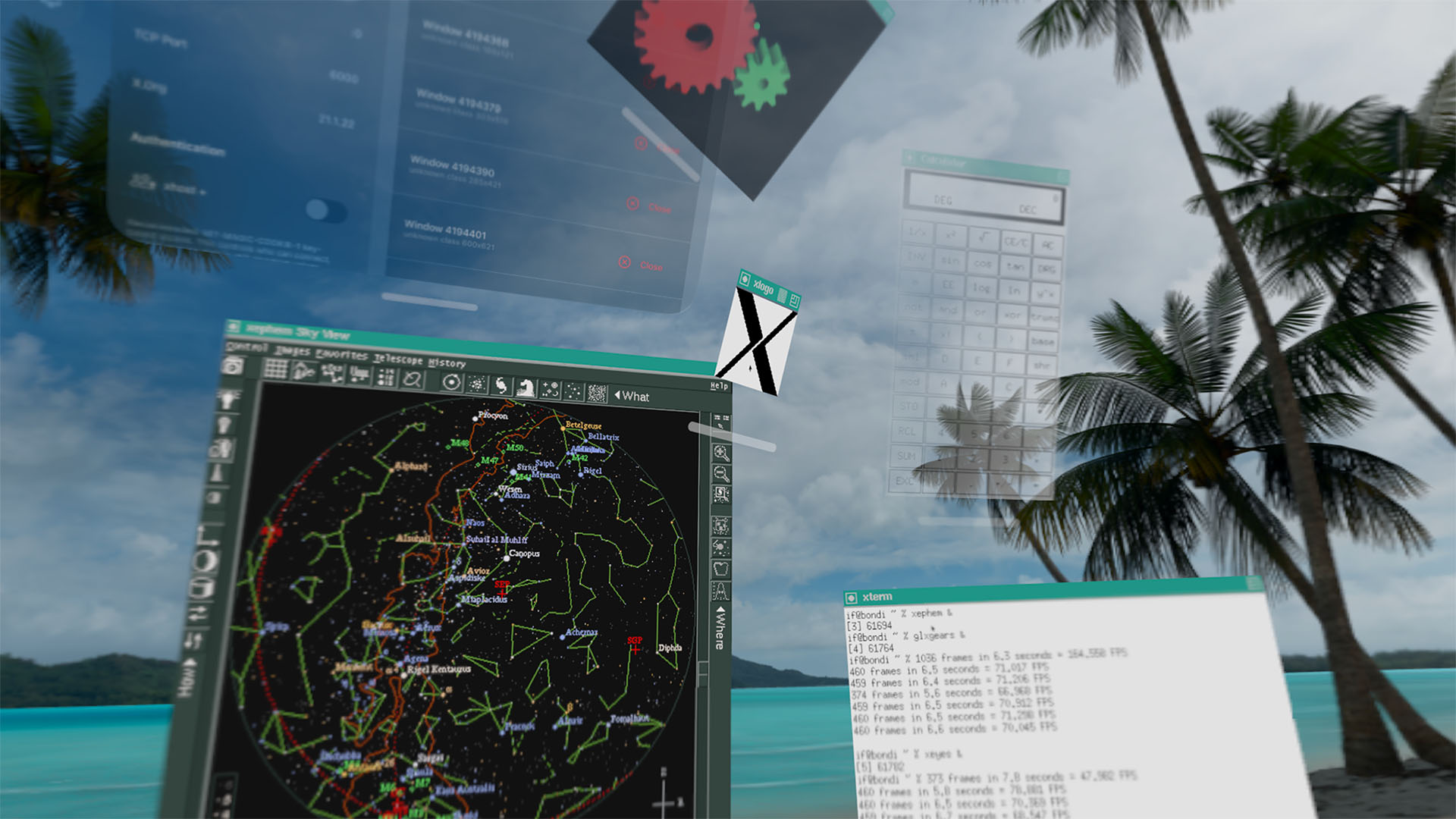
    Developer Ian Finder has built UHF X11, a visionOS app that turns Apple Vision Pro into a full X11 display server. The app lets you connect remote machines and run X Window System clients that appear as native spatial windows you can position anywhere in your physical space.

    How UHF X11 Works

    Once installed on Vision Pro, UHF X11 sets up a standard X11 display server. Remote machines connect using the familiar DISPLAY environment variable:

    setenv DISPLAY VISOR.LOCAL:0

    From there, any X11 client, including xterm, xclock, xcalc, twm, and xlogo, will render its top-level window as a native visionOS spatial window. Each window can be positioned independently in your physical environment.

    The app handles X authority cookies automatically. It generates MIT-MAGIC-COOKIE-1 tokens on the Vision Pro and copies them to client machines for authenticated connections, just like any standard X11 setup over TCP.

    Rootless Spatial Windows

    Unlike traditional X11 setups where all windows live inside a single desktop environment, UHF X11 runs rootless. Every X11 top-level window opens as its own visionOS window. You can scatter an xterm here, an xclock there, and an xcalc somewhere else, all floating in your living room or office space.

    The X framebuffer content is rendered at native resolution with nearest-neighbor scaling for smaller surfaces. This means pixel-art applications and bitmap-font terminals look exactly as they should, without blurry bilinear filtering.

    CRT Effects for Nostalgia

    For those who want the full retro experience, UHF X11 includes CRT scanline presets, phosphor mask overlays, glow effects, and vignette. These effects recreate the look of vintage CRT displays, which is fitting given that many X11 applications were designed for exactly those screens.

    Experimental 3D Support

    The app includes experimental indirect GLX support, meaning OpenGL clients can potentially use GLX rendering over X11 to draw 3D content. Finder notes that “compatibility varies, as it did in the 2000s,” which is an honest assessment. GLX support was always finicky even on native Linux desktops.

    The tagline “3D in 2D in 3D” captures the irony of running a 2D graphics protocol inside a 3D spatial computing environment that itself renders to a stereoscopic display.

    Custom Fonts and Theming

    UHF X11 ships with core X11 bitmap fonts and lets users import custom bitmap font directories from visionOS file system folders. This is essential because many X11 applications, especially older ones, rely on specific bitmap fonts that are not part of modern font rendering stacks.

    External Client Connections

    The app accepts connections from any trusted machine over standard X11 TCP networking. This means you can run UHF X11 on Vision Pro and then SSH into a remote Linux server, set DISPLAY to point at the Vision Pro, and run graphical applications that appear floating in your space. It is a practical tool for developers and sysadmins who work with X11 applications regularly.

    The Nostalgia Factor

    Finder’s project page on lispm.net leans heavily into retro computing aesthetics, with VT terminal-style rendering, Lisp Machine references, and the disclaimer “NO FREE LISP MACHINES.” The app description reads like a product from 1988 reimagined for 2026 spatial computing hardware.

    UHF X11 is available now on the App Store for Apple Vision Pro. The app is free and open source under the MIT license.

    Share. Facebook Twitter Pinterest LinkedIn Tumblr Email
    Geek Planet
    • Website
    • Facebook
    • X (Twitter)
    • Instagram

    Hello, tech enthusiasts! I'm Devender, your guide through the ever-evolving world of technology. With a passion for innovation and a knack for breaking down complex concepts into digestible bits, I'm here to help you navigate the digital frontier.

    Related Posts

    Android 16 Desktop Mode Arrives: New Features Rolling Out to Pixel and Samsung

    Poco M8 Power 5G: 8000mAh Battery Under Rs 25,000 in India

    POCO M8 Power 5G Launches in India Today With 8000mAh Battery

    POCO M8 Power 5G Launches August 4 with 8000mAh Battery

    Amazon Prime Day 2026: Best Tech Deals Still Available This Week

    POCO M8 Power 5G Launching August 4 With 8000mAh Battery in India

    Leave A Reply Cancel Reply

    Top Posts

    Android 16 Desktop Mode: New Features on Pixel and Samsung Phones

    Data Structures and Their Functions in Python

    How do I edit a sent message on WhatsApp?

    Don't Miss

    Android 16 Desktop Mode: New Features on Pixel and Samsung Phones

    Android 16 Desktop Mode updates and what Indian users need to know in August 2026.

    Cyber Security Threats 2026: How Indian Users Should Protect Data

    Mobile Phones Market India August 2026: Best Phones Under Rs 30,000

    SEO Strategies 2026: How Indian Websites Can Rank After Google Updates

    Stay In Touch
    • Facebook
    • YouTube
    • TikTok
    • WhatsApp
    • Twitter
    • Instagram
    TPS4
    Most Popular

    Android 16 Desktop Mode: New Features on Pixel and Samsung Phones

    Data Structures and Their Functions in Python

    How do I edit a sent message on WhatsApp?

    Our Picks

    Android 16 Desktop Mode: New Features on Pixel and Samsung Phones

    Cyber Security Threats 2026: How Indian Users Should Protect Data

    Mobile Phones Market India August 2026: Best Phones Under Rs 30,000

    Subscribe to Updates

    Be Geeky and subscribe to GeekPlanet for Technology, Security and Gadgets.

    Facebook X (Twitter) Instagram Pinterest
    © 2026 GeekPlanet.in Managed by MyAdsMantra Global.

    Type above and press Enter to search. Press Esc to cancel.

    Ad Blocker Enabled!
    Ad Blocker Enabled!
    GeekPlanet is a safe place for every tech lover and is made possible by displaying online advertisements to our visitors. Please support us by disabling your Ad Blocker.