



A new Android malware called Hirudo is stealing bank account credentials by replacing real banking apps with patched copies that switch off their security checks. Security firm ThreatFabric published the findings today, and the malware has already targeted banks in India along with Indonesia, China, Mexico, Morocco, and Thailand.
How the Hirudo Android malware gets in
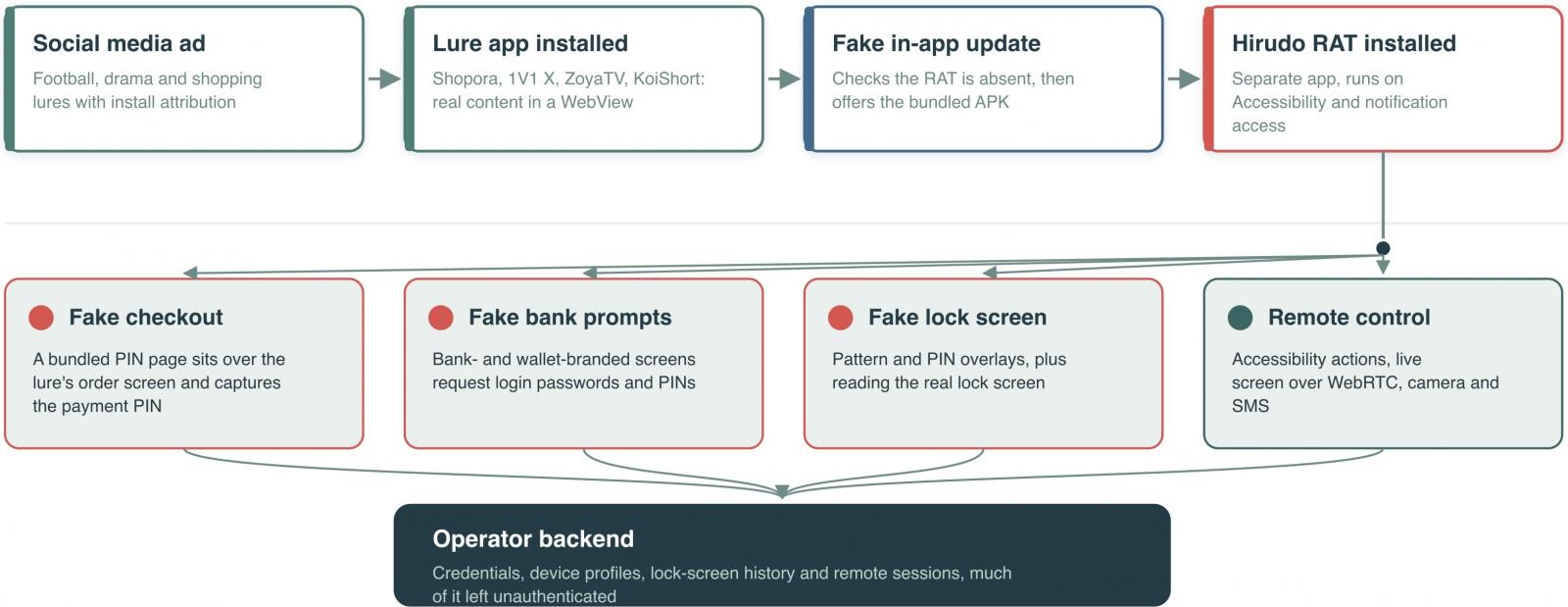
The infection starts with apps that look harmless and actually work. ThreatFabric found Hirudo delivered through a shopping app called Shopora, an adult content app named 1V1 X, and short drama apps ZoyaTV and KoiShort. The apps deliver what they promise, and then show a fake update notification. The update prompt leads to permission screens, including a request to enable Accessibility services.
Once it has Accessibility access, Hirudo launches the uninstaller for the real banking app, downloads a patched copy from its servers, and installs it using the Accessibility permission. ThreatFabric calls this the riskiest stage for the malware, because the victim can interrupt the replacement at two points.
What the patched banking app does
The malicious copy keeps almost all of the original app’s code, so it looks and behaves like the real thing. What it adds is a hooking engine built on the open-source YAHFA and Dobby frameworks. With the engine running inside the banking app’s own process, the app’s own defences are turned against it. On launch, the fake app does the following:
- Substitutes the genuine signing certificate when anything queries it.
- Hides enabled Accessibility services from security apps.
- Removes screenshot protection so operators can view and record the screen.
- Modifies key-attestation certificates and relays Play Integrity checks through an attacker-controlled server.
Researchers found malicious copies of eight banking apps so far, including apps impersonating at least seven Indonesian banks. Indian banks are in the target list too, which makes this relevant for anyone who keeps payment apps on their phone.
What Hirudo steals
Once active, the malware can grab banking passwords, payment PINs, device unlock secrets, and SMS messages. It streams the live screen to its operators, gives access to both cameras, and collects messages. Its fake checkout pages ask for the payment PIN, then show a fabricated payment success screen while the PIN is quietly sent to the attacker.
Is there any good news?
Some. The bundled attestation keybox that Hirudo uses has been publicly leaked, and Google already lists two of its certificates as compromised. That means server-side revocation checks can detect those forgeries. The app replacement process is also visible to the user for a short window. If your banking app suddenly asks you to re-download an update or disappears and reinstalls itself, stop and verify.
How to stay safe on Android
Do not install apps from outside the Play Store, and even on the Play Store check the developer name and review count before downloading. Never enable Accessibility services for an app that asks for them without a clear reason. Turn on Google Play Protect, keep your phone updated, and use a separate device or a hardware token for high-value transactions if possible. If you think a banking app has been tampered with, change your PIN and net banking password from a desktop immediately.
FAQ
What is Hirudo Android malware?
Hirudo is an Android trojan that replaces real banking apps with patched versions that disable signature, Accessibility, and Play Integrity checks so it can steal credentials.
Which countries does Hirudo target?
ThreatFabric has seen it impersonating banks in Indonesia, and it also targets financial organisations in India, China, Mexico, Morocco, and Thailand.
How does Hirudo get onto a phone?
Through fake or repackaged apps like Shopora, 1V1 X, ZoyaTV, and KoiShort that push a fake update prompt and trick the user into granting Accessibility permissions.
Can Hirudo steal payment PINs?
Yes. Its fake checkout pages collect payment PINs and then display a fake payment success message while the data is sent to the attacker.
How do I check if my banking app is safe?
Look for unexpected uninstall and reinstall activity, verify the app’s signature and developer in Play Store settings, and never approve Accessibility access for unknown apps.
