



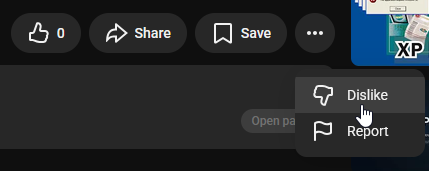
The dislike button on YouTube is disappearing. Not the count, that went years ago. The button itself. New tests on the YouTube desktop site are hiding the dislike option inside an overflow menu next to Report, while the like button stays exactly where it was.
Reports of the change started surfacing over the past couple of weeks, and YouTube has walked this road before with Shorts. If you like knowing that a tutorial wasted 20 minutes of your life before you hit play, this change is aimed at you. Here is what is happening and why YouTube keeps pushing the button out of sight.
What changed with the YouTube dislike button
The new UI test moves the dislike button into the overflow menu, the same three-dot list that holds options like Report. The like button remains front and centre. A report on Twitter/X highlighted by Neowin first showcased the change on the desktop website, with the dislike option hidden from the action bar under the video.
It is not the only sighting. Over the past couple of weeks, users on Reddit have posted threads showing the dislike button vanish entirely for them, with one web user seeing a slightly different layout but the same result. The button was offloaded to the overflow menu alongside Report.
YouTube runs small tests like this all the time, and not every test becomes a permanent change. But there is a strong signal this one sticks: the exact same treatment was already rolled out to YouTube Shorts several months ago. When a change lands on Shorts first and then starts appearing on standard videos, the direction of travel is clear.
A short history of YouTube hiding dislikes
The dislike count disappeared in November 2021. YouTube said at the time that the goal was to “de-weaponise” the button, an effort the company had been talking about for years before that. The platform even acknowledged openly that it was a decision users might disagree with.
The reasoning was targeted dislike campaigns, where organised groups would mass-downvote videos to bury them. Creators, especially smaller ones, said the counts hurt. Viewers countered that the count was the fastest quality signal on the platform, and they have been complaining ever since.
Removing the count did not end the button, though. The dislike option stayed, quietly feeding YouTube’s recommendation feedback. Now the button itself is getting the Shorts treatment, and the feedback loop becomes even more invisible.
Why YouTube wants the button gone
Two reasons keep coming up in the platform’s own explanations and in the coverage around these tests.
- Harassment: Even without a public count, a visible dislike button invites pile-ons. Hiding it raises the effort required to register disapproval from a single click to a small hunt through menus.
- Recommendation hygiene: For YouTube, dislikes are useful private signal. For viewers, the button is a personal bookmark of opinion. Those two goals have never aligned well.
There is also a simpler behavioural read. Users who dislike videos are a minority, and every removed button cleans up the interface for the like-focused majority. It is the same logic that has slowly simplified every major app’s action bar over the past five years.
What viewers lose
For viewers, the dislike count was never really about the number. It was a warning light. A tutorial with a heavily disliked ratio told you the fix does not work. A trailer with dislikes hidden tells you nothing.
With the button now buried in a menu, the honest feedback channel narrows again:
- Effort goes up. One click becomes two taps plus a scan of a menu list. Most people will not bother.
- Signal gets quieter. If fewer people dislike, YouTube’s own systems see less of it, and bad content gets less of the corrective nudge.
- Alternatives matter more. Comments, the description, and the channel’s track record become your main pre-play checks again.
What it means for creators
If you run a channel, the change cuts both ways. The pile-on risk shrinks, which is what the 2021 change was supposed to fix and did not fully manage. But so does the honest, quiet feedback that tells you a video underperformed before the comments section does.
Practical adjustments worth making now:
- Read your Studio analytics for audience retention graphs instead of relying on reaction buttons. The drop-off point tells you what dislikes used to.
- Pin a comment asking what viewers think. Pinned comments pull out the feedback that dislikes used to capture anonymously.
- Watch the like-to-view ratio. It is now the only visible health metric under the video.
- Do not celebrate the change too loudly. If dislikes keep being used as private signal, YouTube keeps valuing them quietly even as the button fades.
Is this final?
Not yet. The layout is in testing, and the team behind 9to5Google could not replicate the change on their end at the time of reporting, which means it is rolling out to a limited slice of users. YouTube has not made an announcement about a full rollout for standard videos.
But the precedent is hard to ignore. Shorts lost the visible dislike button first, and the same design is now showing up on normal videos for some users. When YouTube tests a simplification twice in the same direction, the safe assumption is that the button is on its way out. If you find the change useful or hate it, the feedback threads on Reddit and YouTube’s own test feedback channels are where that opinion currently has a chance of landing.
Is YouTube removing the dislike button from all videos?
For now it is a test. Some users on the desktop site are seeing the dislike button moved into the overflow menu next to Report, while the like button stays visible. The same change already rolled out to Shorts, so many users expect it to become permanent for standard videos too.
Can I still dislike a YouTube video?
Yes. In the tested layout, the dislike option still exists inside the three-dot overflow menu under the video. It takes more clicks than before, but the feedback is still registered by YouTube even though no count is shown publicly.
Why did YouTube remove the dislike count?
YouTube removed the public dislike count in November 2021, saying it wanted to de-weaponise the button and stop organised dislike campaigns. The platform acknowledged at the time that many users would disagree with the decision.
Does disliking a video still affect recommendations?
Yes. Dislikes have been a private feedback signal for YouTube’s recommendation system since the count was removed. Even with the button hidden in a menu, the signal continues to work behind the scenes.
One more note for viewers who relied on dislike ratios to filter content. Browser extensions that estimate dislikes from user data still exist and have grown in popularity since 2021. They are estimates rather than official numbers, but for now they are the only visible counter left on the page.
