



Close Menu
GeekPlanet

    Subscribe to Updates

    Be Geeky and subscribe to GeekPlanet for Technology, Security and Gadgets.

    What's Hot

    TestFlight Releases NetBridge: Turn Your iPhone into a SOCKS5/HTTP Proxy Server

    Google Ends GPU Monopoly: VS Code Now Connects Directly to Colab for Free T4 GPU

    How to Transfer 1TB Between Two PCs Using Only an Ethernet Cable

    Facebook X (Twitter) Instagram
    • Privacy & Policy
    • Terms & Conditions
    • Contact US
    Facebook X (Twitter) Instagram YouTube
    GeekPlanetGeekPlanet
    AtlasVpn
    • Home
    • Gadgets
    • Entertainment
    • Cyber Security
    • How To’s & Guides
    • Reviews
    • Python
    GeekPlanet
    Home - gmail-tips - 5 Most Important Gmail Tips & Tricks
    gmail-tips

    5 Most Important Gmail Tips & Tricks

    Geek PlanetBy Geek PlanetUpdated:October 6, 20232 Mins Read
    Facebook Twitter Pinterest LinkedIn Telegram Tumblr Email
    Hands with world mail delivery on world map background
    Share
    Facebook Twitter LinkedIn Pinterest Email

    You use Gmail many times a day, although you must know all the features of Gmail, but in this post, some such tips have been given which will be very useful to you in your office, so let us know the 5 most important tips and tricks of Gmail.

    How to create a group in Gmail

    Often, to send emails to many different email groups, we have to type their email addresses again and again, which wastes a lot of our time, but there is a feature in Gmail by which you can save your time by creating email groups. No need to type email multiple times

    For this you But where all the mobile numbers of your phone and all the email IDs saved on your Gmail will be visible, here you will see the option of Create Label.
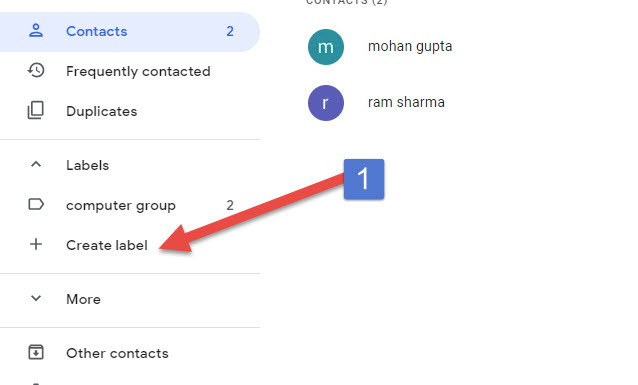
    Create a label by clicking on it. This label will be the name of your email group, so keep such a name that you will remember which people’s emails are going to be in this group.
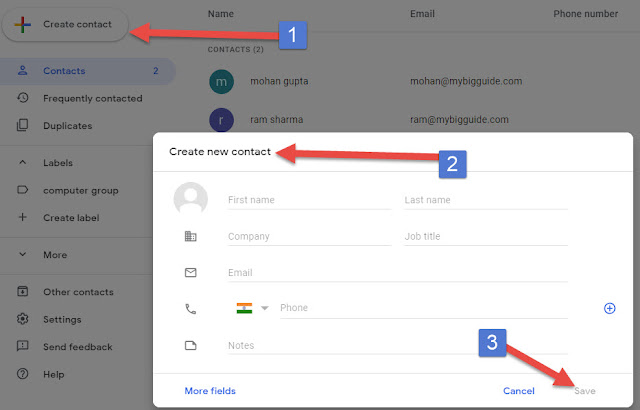
    Now click on Create new contact and fill the information like name, email etc. Here you have to leave the label blank, do not enter it, now save this information, now enter whatever email you want to enter.

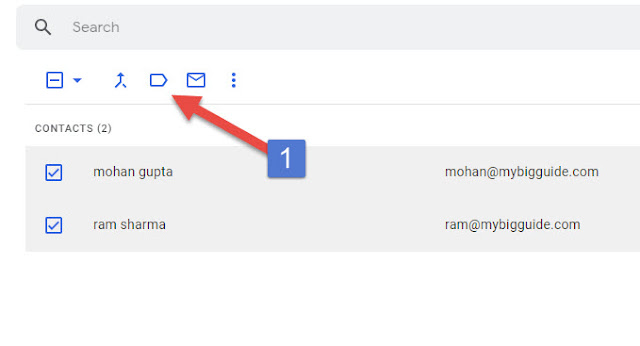
    When all the emails are entered, select all. As soon as you select, you will see the label icon above, click on it, this will apply that label to all these emails.
    Now come back to Gmail and click on compose mail. Now instead of typing the email ID in the To option, type the name of the label that you created. This will automatically add all the email IDs that you had attached to the label.

    Share. Facebook Twitter Pinterest LinkedIn Tumblr Email
    Geek Planet
    • Website
    • Facebook
    • X (Twitter)
    • Instagram

    Hello, tech enthusiasts! I'm Devender, your guide through the ever-evolving world of technology. With a passion for innovation and a knack for breaking down complex concepts into digestible bits, I'm here to help you navigate the digital frontier.

    Related Posts

    Gmail equipped with amazing features – Gmail New Update 2018

    Leave A Reply Cancel Reply

    You must be logged in to post a comment.

    Top Posts

    TestFlight Releases NetBridge: Turn Your iPhone into a SOCKS5/HTTP Proxy Server

    Data Structures and Their Functions in Python

    How do I edit a sent message on WhatsApp?

    Don't Miss

    TestFlight Releases NetBridge: Turn Your iPhone into a SOCKS5/HTTP Proxy Server

    NetBridge lets you route computer or OpenWrt traffic through your iPhone as a proxy—no jailbreak required.

    Google Ends GPU Monopoly: VS Code Now Connects Directly to Colab for Free T4 GPU

    How to Transfer 1TB Between Two PCs Using Only an Ethernet Cable

    Smartwatch Display Tech: Comparing AMOLED vs LCD

    Stay In Touch
    • Facebook
    • YouTube
    • TikTok
    • WhatsApp
    • Twitter
    • Instagram
    TPS4
    Most Popular

    TestFlight Releases NetBridge: Turn Your iPhone into a SOCKS5/HTTP Proxy Server

    Data Structures and Their Functions in Python

    How do I edit a sent message on WhatsApp?

    Our Picks

    TestFlight Releases NetBridge: Turn Your iPhone into a SOCKS5/HTTP Proxy Server

    Google Ends GPU Monopoly: VS Code Now Connects Directly to Colab for Free T4 GPU

    How to Transfer 1TB Between Two PCs Using Only an Ethernet Cable

    Subscribe to Updates

    Be Geeky and subscribe to GeekPlanet for Technology, Security and Gadgets.

    Facebook X (Twitter) Instagram Pinterest
    © 2026 GeekPlanet.in Managed by MyAdsMantra Global.

    Type above and press Enter to search. Press Esc to cancel.

    Ad Blocker Enabled!
    Ad Blocker Enabled!
    GeekPlanet is a safe place for every tech lover and is made possible by displaying online advertisements to our visitors. Please support us by disabling your Ad Blocker.