


Close Menu
GeekPlanet

    Subscribe to Updates

    Be Geeky and subscribe to GeekPlanet for Technology, Security and Gadgets.

    What's Hot

    Android 16 Desktop Mode: New Features on Pixel and Samsung Phones

    Cyber Security Threats 2026: How Indian Users Should Protect Data

    Mobile Phones Market India August 2026: Best Phones Under Rs 30,000

    Facebook X (Twitter) Instagram
    • Privacy & Policy
    • Terms & Conditions
    • Contact US
    Facebook X (Twitter) Instagram YouTube
    GeekPlanetGeekPlanet
    AtlasVpn
    • Home
    • Gadgets
    • Entertainment
    • Cyber Security
    • How To’s & Guides
    • Reviews
    • Python
    GeekPlanet
    Home - gmail-tips - Gmail equipped with amazing features – Gmail New Update 2018
    gmail-tips

    Gmail equipped with amazing features – Gmail New Update 2018

    Geek PlanetBy Geek PlanetUpdated:October 6, 20233 Mins Read
    Facebook Twitter Pinterest LinkedIn Telegram Tumblr Email
    Inbox Communication Notification E-mail Mail Concept
    Share
    Facebook Twitter LinkedIn Pinterest Email
    There would hardly be any person who does not use Google’s email service Gmail. Recently in 2018, Gmail has changed its look and has also added some amazing features, so let us know what is Gmail.

    Gmail equipped with amazing features – Gmail New Update 2018

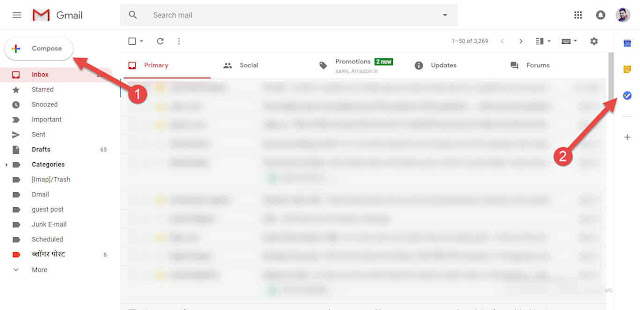
    To try the new version of Gmail, you will have to go to the Settings button. Here you will see the option of Try The New Gmail, just click on it and you will get a completely new look of Gmail, something like this –

    New Compose button

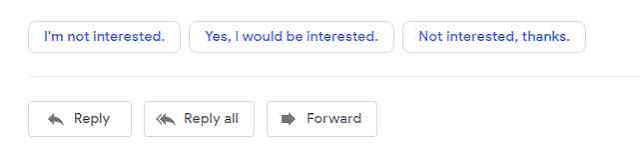
    The biggest change here is that along with the look, the Compose button has also started appearing larger than before, but after clicking, as soon as the Mail Compose window appears, if you have used Microsoft Outlook, then it will be something similar. It is done, it has a cleaner look than before, attachments are visible from the top along with the mail, which makes it easier to download the attachments, Gmail has added the option of Suggested reply so that you can immediately reply to any mail. Are
    Confidential Mode
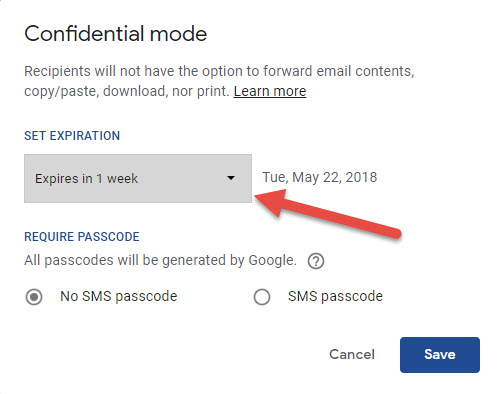
    Confidential Mode is a very powerful option. This option provides this facility to Gmail users. Please, if you wish, you can protect this email in such a way that the person to whom I am sending this email cannot forward it to anyone. Nor can it be printed, that is, Anil will be limited only to the person to whom it has been sent. If the Gmail user wants, he can also set its expiry date along with confidential mode, due to which the email will be automatically destroyed after some time. So this is a very good feature which makes your email very special. If you generate a PASSCODE with confidential mode, then this PASSCODE will be sent to the account of the user to whom you are sending it. This will be an OTP which is sent by Google only. The email sent in confidential mode will open in a separate window from where it can neither be copied nor forwarded nor can it be printed.

    Gmail Add-ons

    Apart from this, advances have also been included in Gmail. By default, 3 add-ons have been provided by Gmail in which options like Google Calendar, Google Keep and Google Task have been given. ) is very useful, you can add any event to Google Calendar directly from the Gmail dashboard, along with this you can include any note in Google Keep and Google Task is a very useful option that you can use throughout the day. All the tasks of A window will open and from there you can add any add on here.

    Tag – Gmail update 2018, Gmail 2018 update, All the new features, How to enable the new Gmail right now, gmail update, how to update gmail to new look, new gmail, gmail mail, gmail update for pc

    Share. Facebook Twitter Pinterest LinkedIn Tumblr Email
    Geek Planet
    • Website
    • Facebook
    • X (Twitter)
    • Instagram

    Hello, tech enthusiasts! I'm Devender, your guide through the ever-evolving world of technology. With a passion for innovation and a knack for breaking down complex concepts into digestible bits, I'm here to help you navigate the digital frontier.

    Related Posts

    5 Most Important Gmail Tips & Tricks

    Leave A Reply Cancel Reply

    Top Posts

    Android 16 Desktop Mode: New Features on Pixel and Samsung Phones

    Data Structures and Their Functions in Python

    How do I edit a sent message on WhatsApp?

    Don't Miss

    Android 16 Desktop Mode: New Features on Pixel and Samsung Phones

    Android 16 Desktop Mode updates and what Indian users need to know in August 2026.

    Cyber Security Threats 2026: How Indian Users Should Protect Data

    Mobile Phones Market India August 2026: Best Phones Under Rs 30,000

    SEO Strategies 2026: How Indian Websites Can Rank After Google Updates

    Stay In Touch
    • Facebook
    • YouTube
    • TikTok
    • WhatsApp
    • Twitter
    • Instagram
    TPS4
    Most Popular

    Android 16 Desktop Mode: New Features on Pixel and Samsung Phones

    Data Structures and Their Functions in Python

    How do I edit a sent message on WhatsApp?

    Our Picks

    Android 16 Desktop Mode: New Features on Pixel and Samsung Phones

    Cyber Security Threats 2026: How Indian Users Should Protect Data

    Mobile Phones Market India August 2026: Best Phones Under Rs 30,000

    Subscribe to Updates

    Be Geeky and subscribe to GeekPlanet for Technology, Security and Gadgets.

    Facebook X (Twitter) Instagram Pinterest
    © 2026 GeekPlanet.in Managed by MyAdsMantra Global.

    Type above and press Enter to search. Press Esc to cancel.

    Ad Blocker Enabled!
    Ad Blocker Enabled!
    GeekPlanet is a safe place for every tech lover and is made possible by displaying online advertisements to our visitors. Please support us by disabling your Ad Blocker.