




Apple’s WWDC 2026 keynote focused heavily on Siri’s AI upgrades and Apple Intelligence, but iOS 27 packs dozens of smaller improvements across everyday apps. From receipt scanning in Wallet to smarter location sharing in Find My, these features will show up on your iPhone this fall.
Apple Maps Gets Flyover Upgrades and Local Lists
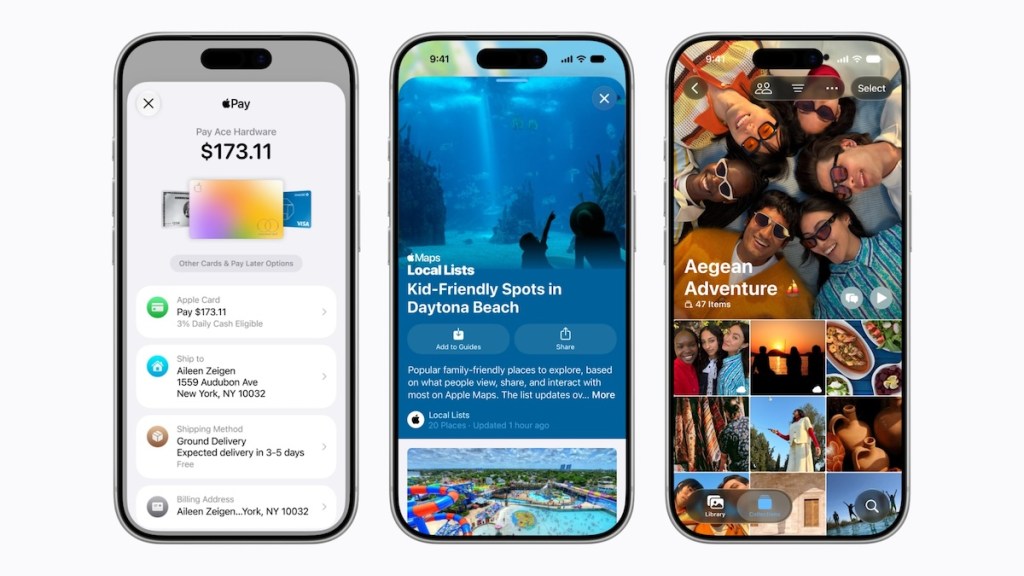
Flyover, the feature that renders immersive 3D views of cities and landmarks, has been refreshed with more detailed visuals and smoother navigation. Apple also introduced “Local Lists,” a way to discover and save trending restaurant and attraction recommendations directly in Maps. It looks like Apple is making a play to pull users away from Google Maps and even Instagram for local exploration.
Find My Adds Flexible Location Sharing
The Find My app is getting more granular controls over location sharing. Users can now share their location for a custom duration, whether that is a few minutes, several hours, or until a specific date and time. There is also a new option to pause location sharing with individual contacts until the end of the day. Apple pitched the feature for surprise parties and similar situations where you need temporary privacy.
Apple Wallet Scans Receipts and Splits Bills
Wallet is receiving one of the biggest feature additions. Users can now point their iPhone camera at a receipt, and Apple Intelligence will identify individual items, calculate each person’s share of taxes and tips, and send payment requests through Messages or Wallet using Apple Cash. The feature also supports digitizing physical membership and loyalty cards by scanning barcodes, with Apple Watch integration for quick access from the Smart Stack.
Hotel guests at participating properties will be able to see trip details, activity schedules, and real-time updates directly within Wallet, alongside their digital room key.
Apple Pay Redesigns Checkout
Online and in-app checkout is getting a visual overhaul. Users can swipe between payment cards while viewing rewards balances, debit account balances, and pay-later options. Apple is also letting users add funds directly to eligible debit cards through Wallet or during Apple Pay checkout.
For merchants, the new “Tap to Share” feature lets customers tap their iPhone on a merchant’s device to share loyalty accounts, shipping addresses, and contact details. It expands the existing Tap to Pay on iPhone capability.
Apple Music Expands Lyrics and Audio Features
Lyrics Translation now supports seven additional language pairs, including English translations for French, German, Italian, Korean, Spanish, and Japanese songs. A new “Lyrics Pronunciation” feature displays phonetically translated lyrics so users can sing along in languages they do not speak. The “AutoMix” feature for smoother song transitions is expanding beyond iPhone to Apple TV and HomePod.
Hi-Res Lossless Audio is now available on Apple TV 4K, letting users with compatible sound systems get studio-quality playback through tvOS.
Apple Podcasts, iCloud Shared Albums, and Fitness+
Podcasts gets a “search within show” feature that works across iPhone, iPad, Mac, Apple Vision Pro, and the web. Video podcasts are coming to Mac and Apple TV. iCloud Shared Albums now supports full-resolution photo sharing, emoji reactions, and temporary albums for short-term projects. Non-Apple users can contribute photos through a web interface.
Fitness+ is launching “Strong Through Menopause,” a three-week program with guided Yoga and Strength workouts for people navigating perimenopause and menopause.
Apple Wallet Hotel Keys Get Smarter
The revamped hotel key experience in Wallet lets guests at participating hotels access trip details, activity schedules, and real-time service updates alongside their digital room key. The feature works with both iPhone and Apple Watch, and hotel staff can push notifications about check-in readiness, dining reservations, or amenity availability directly to the guest’s device.
