



If your Pixel has been crashing and rebooting for no clear reason, you are not imagining it. Google’s own issue tracker is full of the same complaint, and the second beta of Android 17 QPR3 is here to fix it. The update also adds a clever lock for your Quick Settings tiles and a new wallpaper carousel.
Google rolled out Android 17 QPR3 Beta 2 to Pixel devices on October 20. The list of fixes is long, and the headline items are the kind of bugs that make a daily driver feel unreliable. Here is everything new in the update and whether you should install it.
The two new features in QPR3 Beta 2
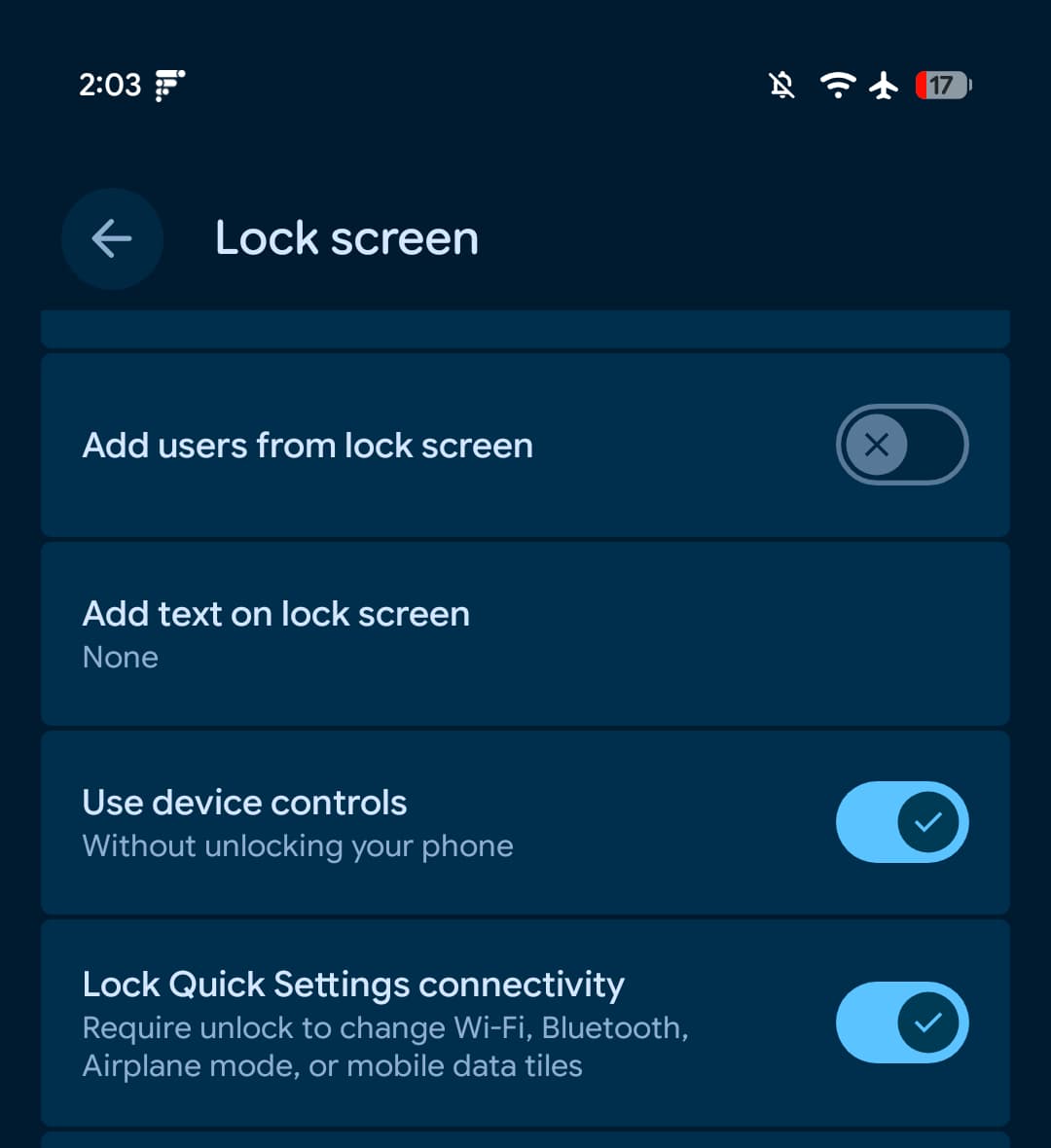
Lock Quick Settings connectivity tiles
The most interesting addition is a new toggle under Settings > Display & touch > Lock screen called “Require unlock to change Wi-Fi, Bluetooth, Airplane mode, or mobile data tiles”. With it on, a locked phone cannot have its radios switched off or on from the Quick Settings panel without the device being unlocked first.
It is a small change with a practical payoff. The lock screen Quick Settings panel is one of the easiest ways for someone picking up your phone to cut your connection or put the device in airplane mode. Requiring an unlock closes that gap. The toggle first appeared in Android Canary 2609 in September and has now landed in the QPR3 beta.
Wallpaper and style carousel
The Wallpaper & style picker gets a carousel that bundles customisation options together: theme packs, custom icons, shape effects, animations, and weather effects. Instead of hunting through separate menus, you can preview combinations as a set. For anyone who spends longer choosing a home screen than watching the video that inspired it, this is the fun addition of the update.
The bug fixes: what Google squashed
Beta 2 is mostly a repair release, and the fix list reads like a summary of the complaints Pixel owners have been filing for months:
- Random crashes and reboots: Devices that intermittently crash and reboot during normal use. Eight separate issue tracker threads are closed by this fix, which tells you how widespread it was.
- Quick Settings tile text: The Internet tile showed persistent text when mobile data was active without Wi-Fi.
- WhatsApp video calls: Devices that unexpectedly shut down during WhatsApp video calls.
- Display blackout: The screen turned black and became unresponsive after ending a phone call.
- Screen recording: Recording froze and stopped capturing frames after rotating the screen.
- Display scaling: System UI, fonts, and apps rendered at an abnormally small scale regardless of display size settings.
- Lock screen animations: In-progress notifications overlapped other UI elements and caused stuttering panel animations.
- Share sheet: The pin icon glitched its position next to pinned apps.
- Media output dialog: It ignored the monochrome system theme when external audio devices were connected.
- Cellular on Dish Network: Data, MMS, and hotspot services failed to connect on Dish Network.
- Terminal app: The Linux development environment virtual machine failed to launch after installation.
- Developer builds: Internal PublishedApi declarations triggered unexpected API lint and source compatibility check errors.
If your complaint was on that list, this beta is aimed squarely at you.
Which Pixels can install it
The beta supports a wide range of devices: Pixel 6a, Pixel 7, Pixel 7 Pro, Pixel 7a, Pixel Tablet, Pixel Fold, Pixel 8, Pixel 8 Pro, Pixel 8a, Pixel 9, Pixel 9 Pro, Pixel 9 Pro XL, Pixel 9 Pro Fold, Pixel 9a, Pixel 10, Pixel 10 Pro, Pixel 10 Pro XL, Pixel 10 Pro Fold, Pixel 10a, Pixel 11, Pixel 11 Pro, Pixel 11 Pro XL, and Pixel 11 Pro Fold.
The update arrives over the air for devices already enrolled in the beta programme. New testers can enrol through Google’s Android Beta for Pixel programme and get the build pushed to their device. Google’s step-by-step guide covers both paths if you want the manual install route.
Should you install a beta on your main phone
It is called a beta for a reason. A few pointers before you tap download:
- Wait a day or two. Early reports filter in fast, and if a build has a serious problem, you will hear about it within hours. One comment on Google’s tracker already notes that some Pixel 11 owners are not seeing the update yet, so availability is still catching up.
- Back up first. Betas can require a rollback at some point, and rolling back wipes the device.
- Do not expect banking apps to behave. SafetyNet and Play Integrity checks can trip on beta builds.
- If your Pixel is your only phone and it is currently stable, waiting for the December stable release that QPR3 becomes is the sensible move. If you are already on Beta 1 and fighting crashes, the update is worth taking today.
What QPR3 means in the Android update calendar
QPR stands for Quarterly Platform Release, the feature drops Google ships between major Android versions. QPR3 is the third such drop for Android 17. Beta 1 landed earlier in October, and Beta 2 is the polish pass that usually arrives two to four weeks before the release candidate. If the usual cadence holds, the final QPR3 release reaches all supported Pixels in December.
That means anything listed in these beta notes is effectively a preview of what every Pixel owner gets before the year ends. The crash fixes alone will matter to millions of devices, which is why a maintenance-looking beta is still worth a headline.
One expectation to set: QPR3 does not redesign Android. The visual changes are limited to the wallpaper carousel and the new lock toggle. If you are waiting for bigger Android 17 features, those arrive with the next major release, not this drop. For everyone else whose Pixel has been acting up, the boring update is the one that fixes your phone.
What is new in Android 17 QPR3 Beta 2?
Two features: a Quick Settings lock that requires unlocking the phone before changing Wi-Fi, Bluetooth, Airplane mode, or mobile data tiles, and a Wallpaper & style carousel that bundles theme packs, icons, shape effects, and animations into one preview. The rest of the update is bug fixes, led by repairs for random crashes and reboots.
Which devices support Android 17 QPR3 Beta 2?
Every supported Pixel from the Pixel 6a through the Pixel 11 Pro Fold, including Pixel Tablet and Pixel Fold models. Devices already enrolled in the beta programme receive it over the air.
How do I fix random reboots on my Pixel?
If you are on the Android 17 beta, installing QPR3 Beta 2 addresses the intermittent crash and reboot issue that Google tracked across eight separate reports. On stable Android, wait for the QPR3 release in December or enrol in the beta programme to get the fix early.
Is it safe to install the Android 17 beta on my main phone?
Betas can have issues with banking apps, and rolling back wipes your device. If your phone is stable on the public release, waiting for the December stable build is the safe choice. If you are already on Beta 1 and hitting bugs, moving to Beta 2 is the better trade.
