



WhatsApp is finally building its own backup system, and Google Drive is no longer the only option. The WhatsApp for Android v2.26.46.4 beta is rolling out with a feature called “WhatsApp cloud storage”: a built-in cloud backup with 2GB of free space, end-to-end encrypted, and completely independent of Google. For anyone with a phone that has no Google account, or a Google storage plan that is always full, this is the feature worth waiting for. Here is how it works, what the paid tiers cost, and how to switch over when it reaches your phone.
What WhatsApp Cloud Storage Is
Until now, backing up WhatsApp chats on Android meant Google Drive. The app had no backup target of its own, so if you ran out of Google storage or used a device without Google services, your chat history lived on the phone and nowhere else.
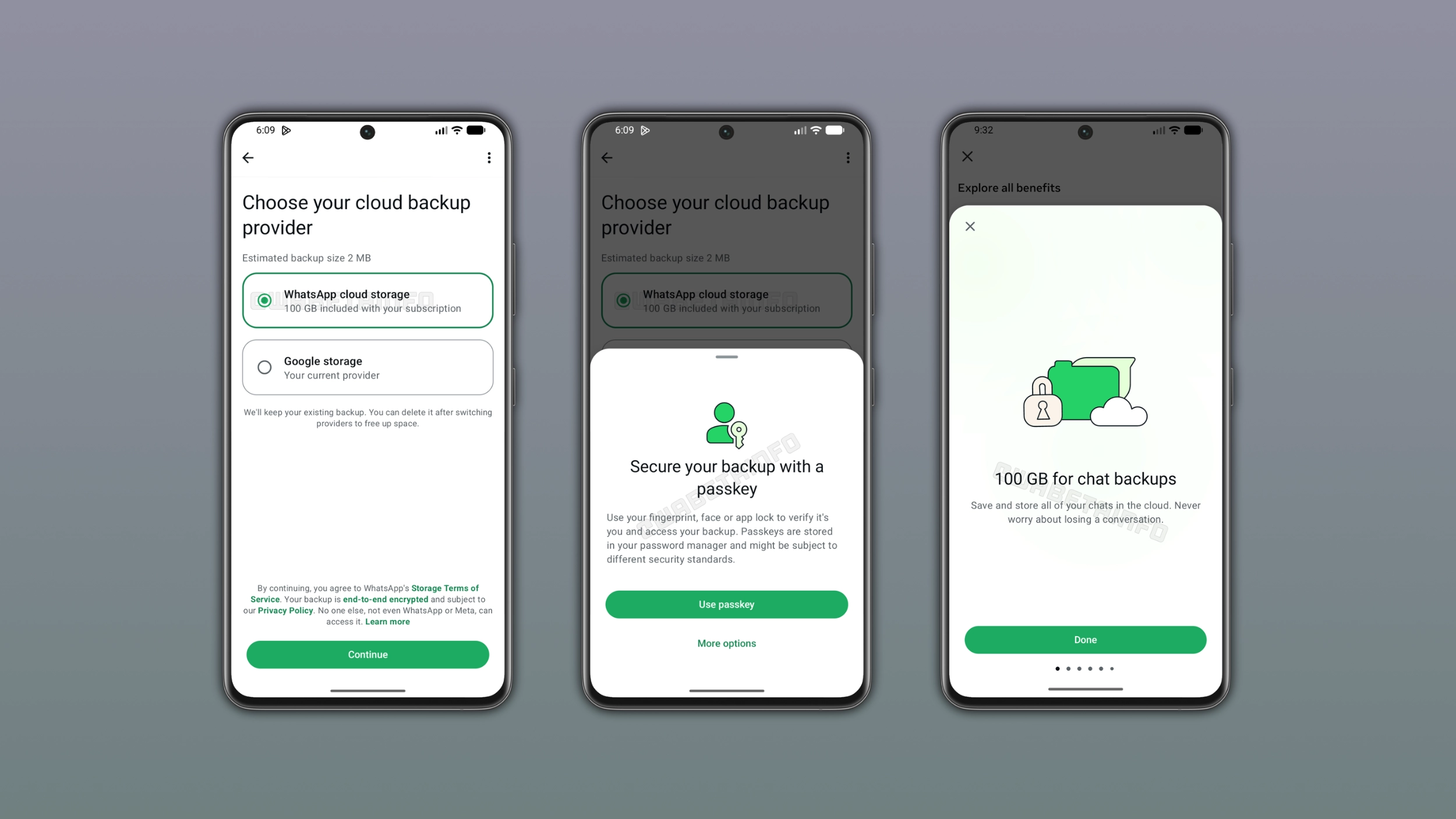
The beta spotted by WABetaInfo changes that. The new option, labelled WhatsApp cloud storage, gives you:
- 2GB of free storage for chat backups, hosted by WhatsApp itself
- End-to-end encryption, same as the messages themselves. WhatsApp cannot read the backup contents
- No Google account required, which makes it the first real backup path for Huawei-style devices and any phone where Google services are absent or signed out
The Google Drive option stays. WhatsApp says you can still choose Google Drive backups instead of the built-in one, so nobody is being pushed off the existing system.
Paid Tiers: WhatsApp Plus and Meta One
Two gigabytes covers messages comfortably but fills up fast once photos and videos enter the backups. WhatsApp is tying the extra space to its subscription plans:
- WhatsApp Plus ($2.99 per month): adds 100GB of backup storage
- Meta One ($7.99 per month and above): offers up to 4TB of cloud storage, in line with Meta’s wider storage bundle
One detail that matters more than it looks: WhatsApp will keep your backup for at least 4 months after your subscription ends, even if you are over the 2GB limit. That is a grace period that Google Drive does not match in the same way. If you cancel and resubscribe within that window, your backup should still be there.
How to Set Up WhatsApp Cloud Backup (Beta)
The feature is in beta, so availability is limited to accounts in the v2.26.46.4 beta rollout for now. When it arrives on your phone:
- Open WhatsApp and go to Settings.
- Open the Chats section and then the Chat backup screen. The backup options live there.
- Look for WhatsApp cloud storage alongside the existing Google Drive backup option.
- Select it and follow the prompts to enable the free 2GB backup.
- Run the first backup while on Wi-Fi. The initial upload includes your existing chat history and media, so it can take a while on a large account.
Steps 2 and 3 describe the beta layout as reported by WABetaInfo and 9to5Google. WhatsApp sometimes rearranges the backup settings screen between builds, so the labels may shift slightly in the stable release.
When Does Everyone Get It
There is no confirmed date for the stable rollout. The feature appeared in the v2.26.46.4 beta, and WhatsApp has not announced when it will reach the general Android release. Beta features can also change or get pulled before launch. iOS availability has not been announced either, and since iPhone users have always backed up to iCloud, the Google Drive problem this solves is mostly an Android problem.
The practical move is to keep the beta installed if you already run it, or join the WhatsApp beta programme through the Play Store listing when slots open. The stable channel will follow once the storage backend is ready for prime time.
WhatsApp Cloud Storage vs Google Drive Backup
Both keep an end-to-end encrypted copy of your chats off the phone. The differences are about limits and lock-in:
- Storage accounting. Google Drive backups count against your Google storage, shared with Gmail and Photos. WhatsApp cloud storage is a separate 2GB that does not touch your Google quota.
- Account requirements. Google Drive backup needs a signed-in Google account. The new option needs only WhatsApp.
- Upgrade pricing. Extra Google storage goes through Google One plans. Extra WhatsApp backup space comes through WhatsApp Plus at $2.99 per month for 100GB.
- Retention. WhatsApp promises to keep the backup at least 4 months past the end of a subscription. Google deactivates unused Drive backups after a period of inactivity.
For most people the sensible setup once this ships is simple: keep Google Drive backup if your Google storage has room, switch to WhatsApp cloud storage if it does not, and use the 100GB tier only if your media-heavy group chats actually need it.
Why This Matters for Android Users
The chat backup gap has been one of WhatsApp’s strangest limitations on Android. Telegram has hosted its own cloud sync since forever. iMessage and WhatsApp on iPhone have iCloud. Only Android WhatsApp handed your backup to a third party and then charged you twice when the storage ran out: once for Google One and again in lost chat history if you never noticed.
With a built-in option, two scenarios get much better:
- Switching phones without Google. Moving between Android devices with different or no Google accounts is the classic way people lose years of chats. A WhatsApp-hosted backup makes the transfer depend on WhatsApp alone.
- Storage management. Backups can quietly eat gigabytes of Google storage and push you into a Google One subscription you did not want. The free 2GB removes the message-history portion of that problem.
The end-to-end encryption point deserves emphasis. Cloud backups have historically been the soft spot in WhatsApp’s security story, since an unencrypted cloud copy defeats the point of encrypted messaging. Both the Google Drive and the new built-in backup are end-to-end encrypted, so the security posture is at least as strong as the system it is joining.
Who Should Switch First
When the feature lands on your phone, three groups of users should move over quickly: people whose Google storage is always full, anyone using an Android device without Google services signed in, and anyone who has ever lost chats during a phone change because the Google account differed between the two devices. Everyone else can keep Google Drive without losing anything, since both backup paths are end-to-end encrypted and both keep the same chat history. The one habit worth building either way is running a manual backup before changing phones or uninstalling WhatsApp, because no cloud system protects you if the last backup predates the messages you care about.
Frequently Asked Questions
Is WhatsApp cloud storage backup free?
Yes, the first 2GB is free. Beyond that, WhatsApp Plus costs $2.99 per month and adds 100GB, while Meta One starts at $7.99 per month and offers up to 4TB. WhatsApp keeps your backup for at least 4 months after a subscription ends.
Do I still need Google Drive to back up WhatsApp on Android?
No. The new WhatsApp cloud storage option backs up your chats to WhatsApp’s own cloud with end-to-end encryption and no Google account needed. Google Drive backup remains available as a choice for anyone who prefers it.
When will WhatsApp cloud backup be available for everyone?
The feature is rolling out in the WhatsApp for Android v2.26.46.4 beta first, as spotted by WABetaInfo. There is no confirmed date for the stable Android release yet, and nothing has been announced about iOS.
Is the WhatsApp cloud backup end-to-end encrypted?
Yes. WhatsApp says the cloud backups remain end-to-end encrypted, so neither WhatsApp nor anyone else can read the backup contents without your chat backup password or encryption key.
