



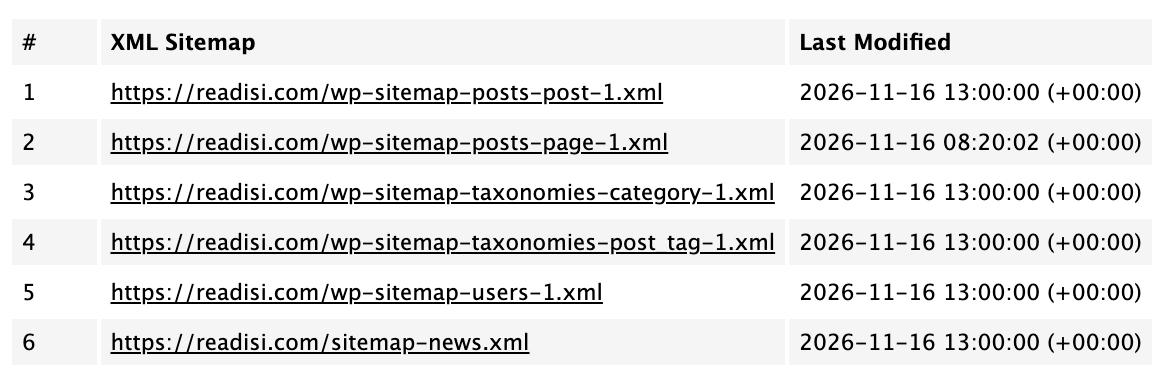
Open your WordPress sitemap in Chrome this week and you will see raw XML code where a tidy table used to be. Before you file a support ticket or start “fixing” SEO settings, take a breath: your sitemap is not broken. Chrome 158, which began rolling out to most desktop and mobile users on 17 November, dropped support for client-side XSLT, the styling language WordPress and major SEO plugins used to make sitemaps readable in browsers. Nothing about your site’s SEO changed. Here is what happened, how to check it, and what not to touch.
What Changed in Chrome 158
Chrome 158 removes support for XSLT (Extensible Stylesheet Language Transformations) in the browser. For years, WordPress core and SEO plugins including Yoast SEO, Rank Math and All in One SEO have referenced a .xsl stylesheet inside their XML sitemaps. When you opened a sitemap URL in Chrome, the browser executed that stylesheet and transformed the XML into a clean, clickable HTML table.
With XSLT gone, opening the same URL now shows unstyled XML markup, often alongside a browser console warning. The sitemap itself is untouched. Only the browser-side decoration disappeared.
Why Your Sitemap Looks Broken (But Is Not)
The confusion has a specific timing problem. Chrome 158 arrived on 17 November while Google’s November 2026 core update, which started on 10 November, is still rolling out. Site owners doing ranking audits during the update are seeing raw XML for the first time and connecting two unrelated things.
The mechanics are simple:
- Your server still serves the exact same XML file it always did.
- The file still references the .xsl stylesheet at the top.
- Chrome no longer executes that stylesheet, so it renders the raw source instead.
- Search engines never used the stylesheet in the first place.
That last point is the one to remember. Googlebot, Bingbot and every other serious crawler parse the raw XML nodes such as <loc> and <lastmod> directly. Crawlers deliberately avoid browser-side styling. Indexing, crawl efficiency and rankings are not affected by this change.

How to Check Which Sitemap Your Site Serves
WordPress serves its sitemap index from one of two places, depending on your setup:
- WordPress core sitemap: yourdomain.com/wp-sitemap.xml, the default when no SEO plugin overrides it.
- SEO plugin sitemap: yourdomain.com/sitemap_index.xml for Yoast SEO, Rank Math or All in One SEO. Typing sitemap.xml usually redirects there.
To confirm everything is healthy after the Chrome change:
- Open the sitemap in your browser. Raw XML is now expected. Scroll and confirm the
<loc>URLs are all present. - Use Google Search Console. The Sitemaps report shows what Google has actually read and indexed from the file. This is the source of truth, not the browser view.
- Run the URL Inspection tool on a few key pages. If Google sees the pages as indexed, your sitemap is doing its job.
- Check the response headers. A 200 status for the sitemap URL means crawlers can fetch it fine.
A Quick Technical Look at What XSLT Did
For the curious, here is the mechanism in plain terms. An XML sitemap is a list of URLs wrapped in tags such as <url>, <loc> and <lastmod>. At the top of the file sits a processing instruction that points to a stylesheet, usually something like wp-sitemap.xsl or a plugin equivalent.
For two decades, browsers executed that stylesheet on the fly. The stylesheet contained rules like “turn every <loc> value into a clickable link” and “wrap the whole thing in a table with a heading”. That is why the sitemap looked like a neat web page. Chrome 158 removed the engine that ran those rules. The file, the tags and the data are all still there; the browser just displays the source instead of transforming it.
This is also why the change is cosmetic. A crawler reads the same tags regardless of whether any stylesheet exists. The visual layer was only ever for humans doing quick checks in a browser tab.
What Not to Do
The worst response to this change is a panicked one. Specifically:
- Do not delete the .xsl reference from your sitemap. It does no harm, and editing core or plugin files for cosmetics creates upgrade problems later.
- Do not install a “sitemap fix” plugin. There is nothing to fix. Plugins promising to repair sitemap styling are solving a browser display issue that has zero SEO impact.
- Do not resubmit or regenerate sitemaps out of panic. Resubmitting in Search Console is harmless but pointless here.
- Do not read the raw XML as a penalty signal. It is a rendering change in your browser, not a message from Google.
Tips for WordPress Site Owners
- Use Search Console as your sitemap dashboard. Browser prettification was always cosmetic; Search Console coverage reports are where real problems show up.
- Separate the two events. Ranking movement this month belongs to the November core update conversation. Sitemap appearance belongs to the Chrome 158 conversation. Keep them apart in client reports.
- Verify crawler access directly. Fetch the sitemap with curl or a server-side request and check for a 200 response and well-formed XML.
- Keep your SEO plugin updated. Yoast, Rank Math and AIOSEO may drop the .xsl reference in future versions to clean up the console warning. Let the plugin handle it.
- Document the change for clients. If you manage sites for others, send a one-line note now. It will save a dozen support emails this month.
Frequently Asked Questions
Why is my WordPress sitemap showing raw XML code?
Chrome 158 dropped support for client-side XSLT on 17 November, so the browser no longer applies the stylesheet that turned sitemap XML into a readable table. The sitemap file itself is unchanged and crawlers are unaffected.
Does the Chrome 158 XSLT change hurt my SEO?
No. Googlebot and Bingbot parse the raw XML nodes directly and never relied on XSLT. Indexing and rankings are unaffected. Only the browser view of the sitemap changed.
How do I check if my sitemap is working correctly?
Use Google Search Console’s Sitemaps report to confirm Google has read the file, and run URL Inspection on key pages to check indexing. Opening the sitemap in Chrome and seeing raw XML is now normal.
Should I remove the .xsl reference from my sitemap?
There is no need. The reference does no harm, and editing core or plugin code creates maintenance problems. Your SEO plugin may clean it up automatically in a future update.
