



After four years of building a browser engine from scratch, the Ladybird project shipped its first downloadable alpha on November 23, 2026. Until now, the only way to try Ladybird was to compile it from source. The alpha gives macOS and Linux users a prebuilt package with automatic updates, and early testing shows a browser that is far more capable than its alpha label suggests. Here is what makes Ladybird different, what works today, and how to try it safely.
Why Ladybird Matters: It Is Not Another Chromium Fork
Chrome, Edge, Brave, and Opera all run on Google’s Blink engine. Firefox uses Gecko. Safari uses WebKit. Ladybird’s rendering engine and its LibJS JavaScript engine were written from scratch, not forked from anything. As project lead Andreas Kling wrote in the announcement: “The engine is our own, built from the ground up, and not a fork. The browser around it is modest, but functional.”
That makes Ladybird the fourth independent browser engine in existence. Why that matters for everyone:
- Web developers usually optimise for Chromium, since that is where the traffic is, and the web platform then drifts toward whatever Chromium supports
- An independent engine exposes those assumptions. When a site breaks on Ladybird, it often reveals that the site depends on Chromium behaviour rather than published web standards
- More engines mean better standards testing. Every additional implementation gives spec writers another target to test against
The project grew out of Kling’s SerenityOS hobby operating system before splitting off as its own effort. It is run by the Ladybird Browser Initiative, a 501(c)(3) nonprofit funded by sponsorships and donations, and the project highlights that it has no sponsored search engine deals and that sponsors get no say in the roadmap.
What Works in the First Alpha
Ars Technica tested alpha version 2026.47.8 on a mini PC running Fedora Linux 44 with KDE Plasma 6.8.3, and the most surprising finding was how little it felt like alpha software:
- Everyday browsing: tabbed browsing felt snappy and normal, a 50MB test video downloaded quickly, and switching between a dozen open tabs was instant
- Heavy sites: Google Maps loaded instantly with working layers and Street View, GitHub repository navigation worked without a hitch, and YouTube and news sites were fine
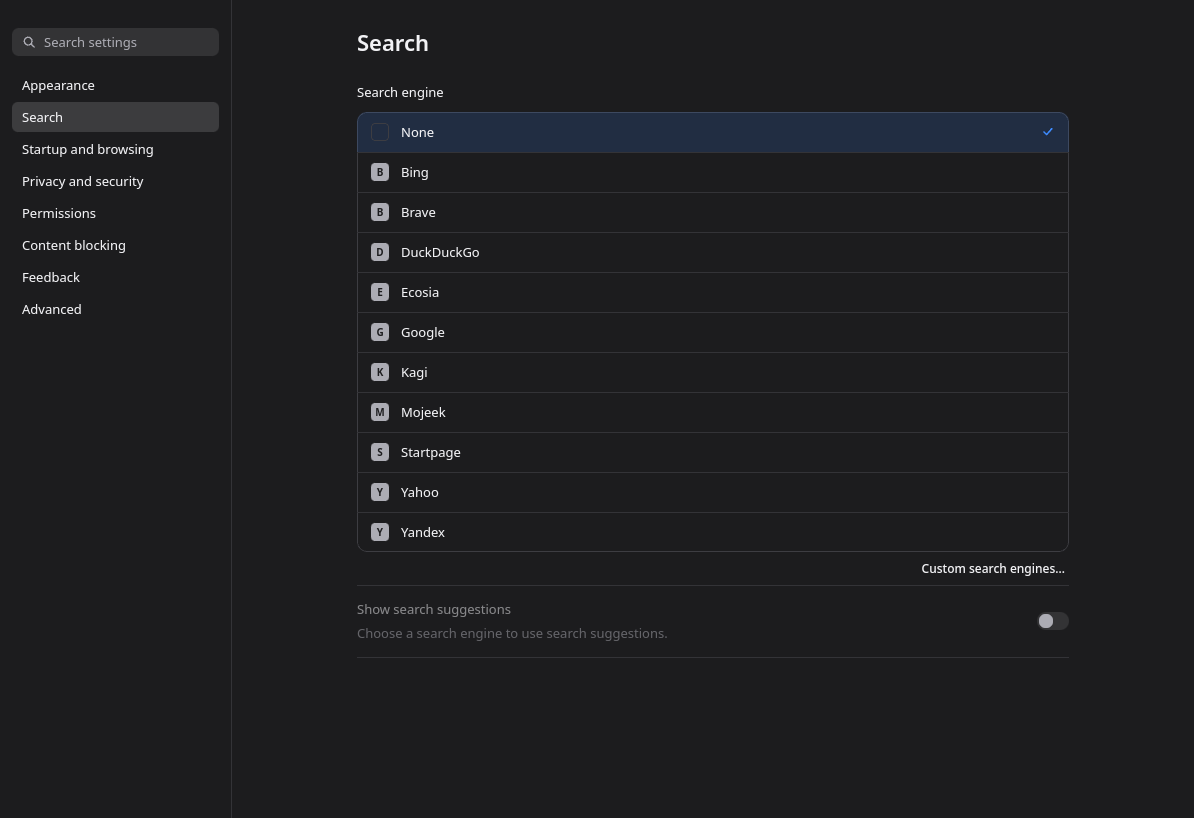
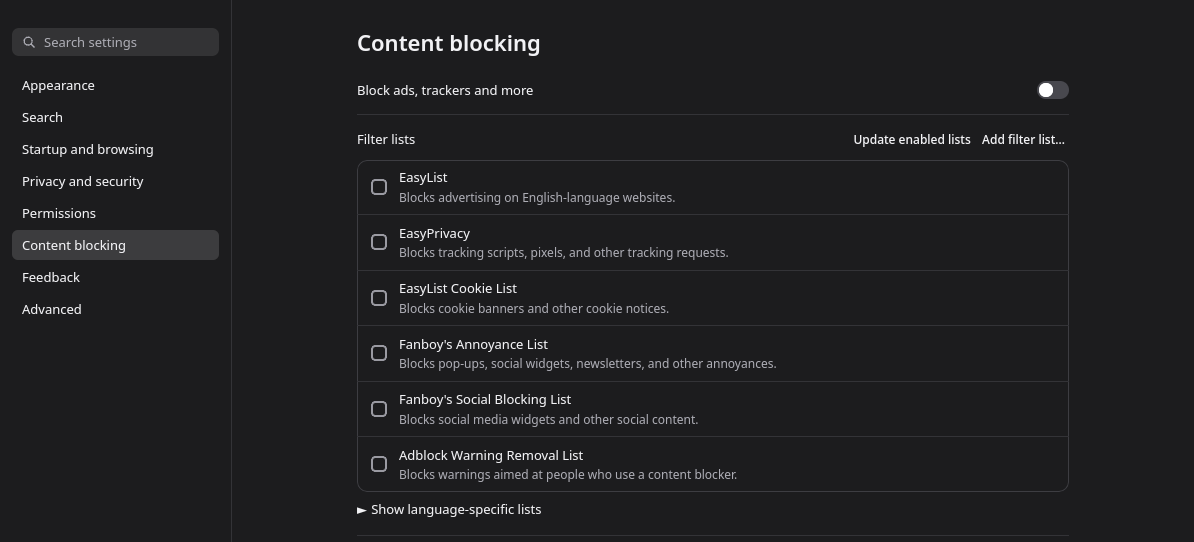
- Options: menus are surprisingly complete for a build this young, with content blocking lists, autoplay blocking, and permission controls built in
- Default search engine: None. The browser ships without a search deal and lets you pick your own
- Automatic updates: the alpha is a rolling release channel that updates itself
Under the hood, the project began in C++ in keeping with the SerenityOS ethos, but has started shifting toward Rust, beginning with the JavaScript engine.
What Does Not Work Yet
Ladybird is still early, and the team is open about the limits:
- No Windows build yet. The downloadable alpha is macOS and Linux only. Windows support is planned for the future
- It can still stall. Ars could freeze the browser by streaming 4K video from a local Jellyfin server and repeatedly skipping through the file. It took deliberate effort to trip it up
- Security promises: none. Kling is blunt about it: “We want security nerds to hack it! A new browser gets hacked, over and over, and that’s part of the process, so we make no promises about security today.”
- Not a daily driver yet. The Ars verdict was that it will not replace Firefox soon, though the tester came away genuinely impressed with a scratch-made engine performing this well
The browser includes a built-in tool for reporting sites that fail to render or crash the app, so testers can feed fixes directly into development.
Tips: How to Try Ladybird Without Regret
- Download from the official site only. Prebuilt macOS and Linux packages are at ladybird.org/download. Avoid third-party mirrors
- Keep your main browser as default. Treat Ladybird as a second browser for exploration until the security story matures
- Use the site report tool. When a page breaks, reporting it is how the engine improves. This is the most useful thing testers can do
- Try standards-heavy sites. Maps apps, video sites, and webmail are the real test of an engine. Note what works and what does not
- Do not move your passwords over yet. With no security promises in the alpha, keeping logins in your established browser is the sensible call
- Watch the Rust migration. The engine’s shift from C++ to Rust is a long-term story worth following if you care about browser technology
How Ladybird Compares With Other Browsers
Set the alpha against the browsers people actually use and the shape of the project becomes clear. Chromium-based browsers offer the best site compatibility and the deepest extension ecosystems, but they all follow Google’s engine decisions. Firefox offers independence with a mature Gecko engine, though its market share keeps shrinking. Safari is polished but locked to Apple hardware. Ladybird currently wins none of these categories and is not trying to. Its value is as a clean-room implementation: where Chrome and Firefox agree because they share history, Ladybird tests the written standards themselves.
That role has precedent. The last time the web had a genuinely independent engine race, users got faster JavaScript, better standards compliance, and the end of the old Internet Explorer monoculture. Ladybird is decades behind in features and user share, but the Ars testing shows the foundation is real: sites load, videos play, and the browser behaves like a browser. For a project funded by donations and staffed largely by open source contributors, that is a meaningful milestone.
FAQ
Is the Ladybird browser available to download now?
Yes. The first downloadable alpha arrived on November 23, 2026, as prebuilt packages for macOS and Linux with automatic updates. Before this release, users had to compile the browser from source.
What engine does Ladybird use?
Ladybird uses its own rendering engine and its own LibJS JavaScript engine, both written from scratch. It is not a fork of Chromium, Gecko, or WebKit, which makes it the fourth independent browser engine after Blink, Gecko, and WebKit.
Does Ladybird work on Windows?
Not yet. The current alpha runs on macOS and Linux only, and the project says Windows support is planned for the future.
Is Ladybird safe to use as my main browser?
Not yet. Project lead Andreas Kling makes no security promises for the alpha and encourages security researchers to test it. It is suitable for trying out and reporting bugs, but keeping your main browsing and passwords in a mature browser is the safer approach for now.
