



If your ChatGPT usage bar has been draining faster this week, you are not imagining it. OpenAI fixed a billing bug that had been incorrectly discounting GPT-6.2 Astra and Sol usage, which means the same tasks now eat into your plan faster: about 40 per cent faster on GPT-6.2 Astra and 25 per cent faster on Sol. Here is what went wrong, what OpenAI is giving subscribers in return, and how to stretch your remaining allowance.
What the Billing Bug Actually Did
The problem was on OpenAI’s side, not yours. Tibo Sottiaux, who works on Codex and ChatGPT at OpenAI, explained in a post on X that a mistake in the usage accounting had been incorrectly discounting GPT-6.2 Astra and Sol usage for most users. In plain terms, the meter was undercounting what people were consuming.
That discount has now been removed. OpenAI says it will not charge anyone for the difference caused by the mistake, but the flip side is that your plan’s usage allowance gets consumed at the correct, higher rate from now on. Sottiaux put it directly: “We’ve fixed this now, so the same work will use more of your plan’s usage allowance.”
Two things are worth keeping in mind:
- The change only affects GPT-6.2 Astra and Sol. Other models keep their existing usage calculations, so if you route heavy work through a different model, your limits are unchanged.
- OpenAI’s position is that both models still offer better usage efficiency than their predecessors, GPT-6 Astra and GPT-6.1 Sol. The fix corrects the metering, not the model performance. Nothing about the model quality changed this week.
How Much Faster Will You Hit Limits
Comparing to last week, OpenAI’s own numbers say you will reach your limits:
- 40 per cent faster on GPT-6.2 Astra
- 25 per cent faster on Sol
Heavy users will feel this first. If you were already brushing against your cap on long coding sessions, research runs or agent tasks, the same workload will now stop earlier in the cycle. The change does not just trim the edges. If a full day of work previously left 10 per cent of the allowance, the same day will now come up short.
Reports from earlier in November point in the same direction. OpenAI has been merging Chat and Work features into one surface, and the company has warned that heavy ChatGPT users may hit limits sooner as those two worlds combine. This week’s metering fix lands on top of that shift, which is why the change feels sharper than a normal adjustment.
This is also not the first limit fight this month. Earlier in November, OpenAI faced backlash over a planned 50 per cent cut to ChatGPT Pro usage limits and then doubled the Pro limits instead. It also announced it was doubling Pro usage limits while bringing Work features into Chat. The direction of travel is clear: the allowance is the product’s most contested resource right now, and the numbers move often. Anything you read about ChatGPT limits older than a couple of weeks deserves a second look.
The Free Reset OpenAI Is Giving Everyone
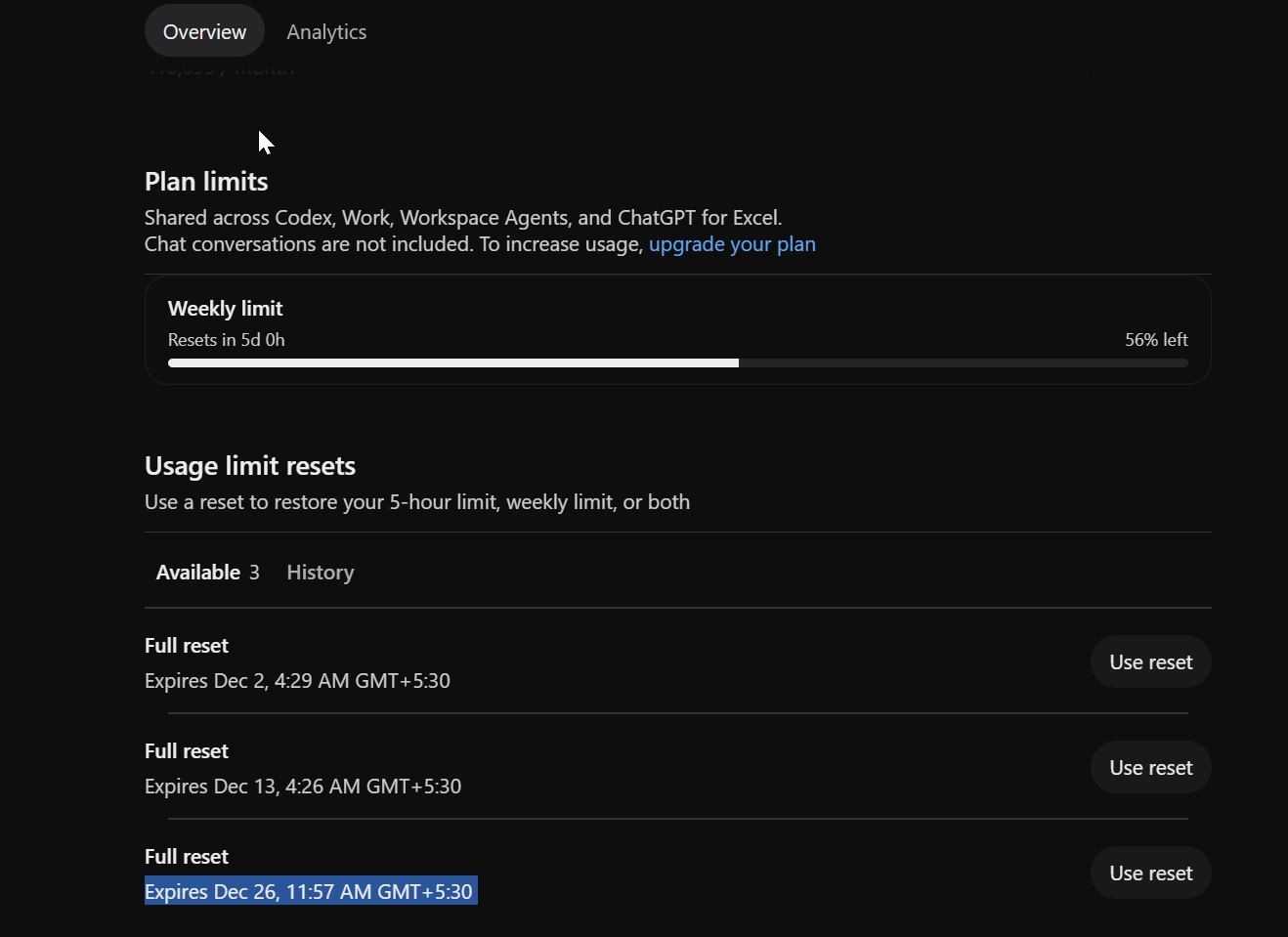
As an apology, OpenAI is adding one banked usage reset for everyone on the Go, Plus, Pro and Business plans. Sottiaux called it “a small token to apologize for the mistake.” The reset is already showing up in accounts, and it expires a month after it is added, so there is no reason to sit on it.
How to claim it:
- Open ChatGPT and go to Settings.
- Open the Usage tab.
- Click Reset to restore your exhausted usage limits.
One reset is not the same as 40 per cent more usage, as hands-on testing of the new screen makes clear. It restores an exhausted cycle once, then the reset is gone. After that, the faster burn rate is the new normal until OpenAI adjusts pricing or allowances again.
What GPT-6.2 Astra and Sol Are
For readers tracking the model lineup: GPT-6.2 Astra and Sol are OpenAI’s current generation models, successors to GPT-6 Astra and GPT-6.1 Sol. Earlier coverage of the GPT-6.1 generation, including the Terra release with faster agents and lower pricing, shows how quickly this stack has moved over the past month. Astra is the flagship line in the ChatGPT product, while Sol covers the lighter tier. Both now share the corrected metering.
If you mainly use ChatGPT for quick questions, drafting or summaries, you may not notice the change at all. The correction bites hardest on the workloads that push the models: long agent runs, big code refactors and multi-hour research sessions.
Tips: Getting More Out of Your Plan
You cannot change the metering, but you can change how you spend it. Practical ways to make the allowance last:
- Match the model to the task. Reserve GPT-6.2 Astra for work that needs it. Lighter tasks on cheaper models do not touch the Astra and Sol calculation at all.
- Bank the reset for a bad day. The free reset expires in a month. Use it when a deadline collides with an empty usage bar, not on a quiet Tuesday.
- Compress long prompts. Big pasted logs and repeated context inflate token usage quickly. Summarise the problem and paste only the relevant parts.
- Split work across the cycle. Usage resets are cyclical. Spreading heavy jobs across the reset window avoids hitting a wall mid-task.
- Watch the Usage tab. The Usage screen in Settings now shows how the cycle is tracking. A quick look before a long session saves surprises later.
- Keep receipts of announcements. OpenAI has changed limits three times this month alone. Checking the official status posts before buying a plan upgrade avoids paying for headroom that may shift next week.
The lesson from this episode is that usage allowances are now dynamic enough to deserve monitoring. A billing correction, a product merge or a backlash-driven policy flip can all move your effective quota within days. Set a habit of checking the Usage tab weekly, keep one cycle of headroom for deadlines, and treat any plan upgrade as a decision to revisit monthly rather than once a year.
FAQ
Why is my ChatGPT usage limit being reached faster?
OpenAI fixed a bug that had been incorrectly discounting GPT-6.2 Astra and Sol usage. With the metering corrected, the same work consumes more of your allowance, so you reach limits about 40 per cent faster on Astra and 25 per cent faster on Sol compared to last week.
Is OpenAI charging for the extra usage caused by the bug?
No. OpenAI says it will not charge users for the usage difference caused by the mistake. As an apology, it is adding one banked usage reset for everyone on Go, Plus, Pro and Business plans, visible under Settings and the Usage tab.
Which ChatGPT models are affected by the usage change?
Only GPT-6.2 Astra and Sol. Other models retain their existing usage calculations. OpenAI says both models still deliver better usage efficiency than GPT-6 Astra and GPT-6.1 Sol.
How do I claim the free ChatGPT usage reset?
Go to ChatGPT Settings, open the Usage tab and click Reset. The banked reset restores exhausted limits once and expires a month after it is added to your account.
