



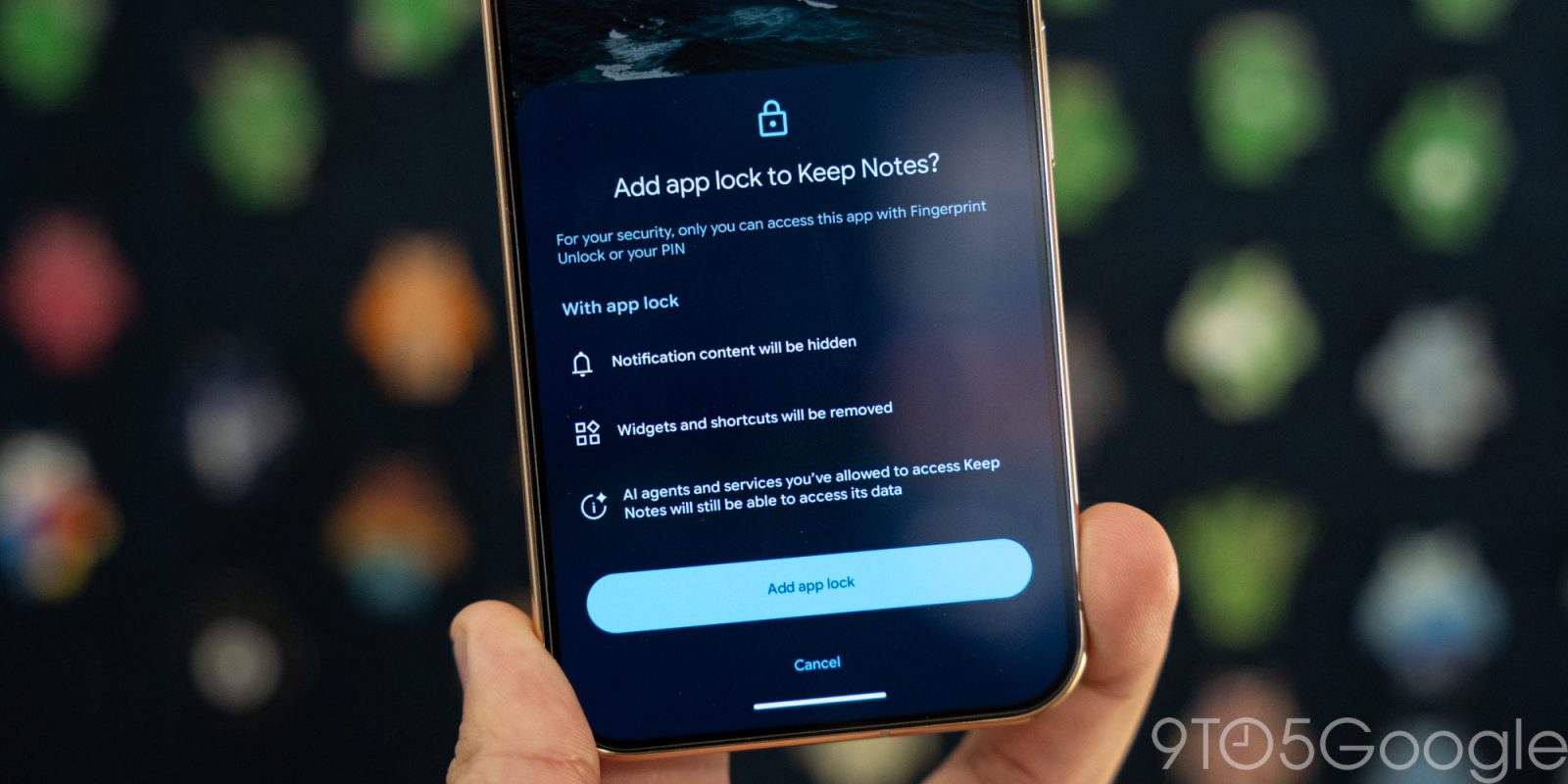
App Lock has had the strangest journey of any Android privacy feature this year. It appeared in an Android 17 QPR2 beta build in August, vanished without explanation, resurfaced in October, and this week Google made it official again. The feature is now re-released for Pixel phones in Android 17 QPR3 Beta 3, and Samsung’s One UI 9.5 beta brings the same capability to Galaxy devices. Here is what App Lock does, the timeline of its removal and return, and how to lock apps on your phone today.
What Is App Lock?
App Lock puts a biometric or PIN wall in front of individual apps. When an app is on the lock list, opening it demands authentication, and the system also hides that app’s notifications, widgets and data from on-device AI services. It is the kind of privacy control that used to require a third-party launcher or a Samsung Secure Folder workaround.
Three details make Google’s version more useful than the typical app locker:
- It is built into Android, not a separate app. No extra permissions, no accessibility-service tricks, no battery drain.
- AI data is hidden too. Locked apps are kept out of reach of the system’s AI features, which matters more every year as assistants start reading your screen content.
- Notifications are masked. Message previews from locked apps stay hidden on the lock screen.
Why Google Pulled App Lock and Brought It Back
App Lock first appeared in an August build of the Android 17 QPR2 beta. Users liked it immediately. Then it disappeared from later updates without a formal explanation.
Google’s Community Engagement Manager explained the removal in a Reddit post this week: the product team “decided to temporarily pull back the feature from the QPR2 Beta to allow for additional polish, thorough testing, and robust integration across all system surfaces”. The feature returned in QPR3 Beta 3 in October, and the 18 November release marks its official re-release.
The knock-on effect is a version gap worth knowing about. App Lock is built into Android 17 QPR2, which is the release Samsung’s One UI 9.5 is based on, so Galaxy phones are getting it through Samsung’s beta now. Pixel phones, however, do not get it until QPR3, which means the Pixel stable track waits until early 2027.
How to Lock Apps With App Lock
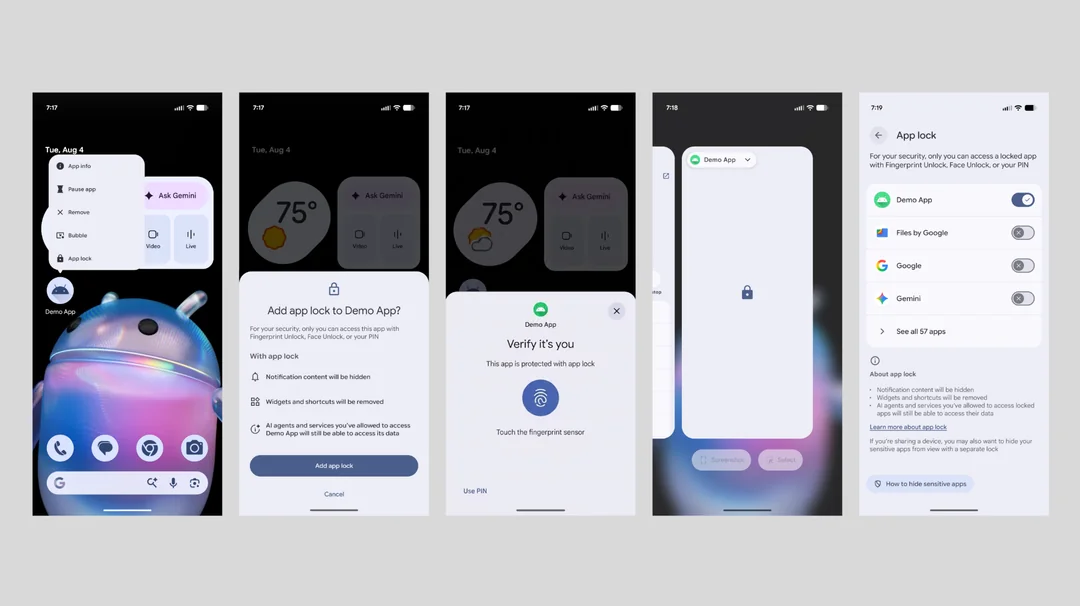
On a Pixel running Android 17 QPR3 Beta 3, the flow takes a few seconds:
- Long-press the app icon you want to lock on your home screen or app drawer.
- Add it to the app lock list from the pop-up menu.
- Confirm with your fingerprint, face or PIN the next time you open the app.
- Check notification settings for the locked app so previews stay masked.
The feature is still beta-only on Pixel, so you need the QPR3 Beta 3 build installed. If you are on the stable channel, the wait is until the QPR3 stable release expected in early 2027.
Samsung Galaxy Gets App Lock With One UI 9.5
Samsung’s One UI 9.5 beta, which rolled out this week, ships with App Lock support as well. Because One UI 9.5 is based on Android 17 QPR2, the feature is present from the start rather than arriving in a later drop.
Two timeline points for Galaxy users:
- The Galaxy S27 series will likely ship with App Lock out of the box, since new flagships launch on One UI 9.5.
- Older Galaxy devices get One UI 9.5 around May 2027, if Samsung follows the rollout pattern of One UI 8.5. The beta itself installs through the Samsung Members app on supported devices.
That means Samsung phones will actually get stable App Lock before Pixels do, a reversal of the usual order for Android features.
Which Phones Get App Lock and When
Because App Lock lives inside Android 17 QPR2 and QPR3 rather than in a separate app, availability depends entirely on which build your phone runs:
- Google Pixel, now: Android 17 QPR3 Beta 3 or newer beta builds.
- Google Pixel, stable: expected with the QPR3 stable release in early 2027, around March if the usual cadence holds.
- Samsung Galaxy flagships, now: the One UI 9.5 beta, installable through the Samsung Members app on supported devices.
- Samsung Galaxy S27 series: expected to ship with App Lock out of the box.
- Older Samsung devices: expected around May 2027 with the One UI 9.5 stable rollout, based on the One UI 8.5 timeline.
- Other Android brands: the feature sits in Android 17 QPR2, so manufacturers building on that release can enable it in their own skins.
Tips to Get the Most From App Lock
- Start with the high-value apps. Banking apps, payment wallets and password managers deserve the lock first, then private messaging apps.
- Remember the AI angle. Locking an app also removes its data from system AI features. If you use on-device summaries or smart replies, test that your locked apps behave the way you expect.
- Lock the app store too. If you hand your phone to kids, locking the Play Store or Galaxy Store stops surprise installs and accidental purchases.
- Do not rely on it alone for shared phones. App Lock is a privacy layer, not a full multi-user setup. Android’s restricted profiles remain the better option for shared devices.
- Watch the stable rollout. Pixel users who do not want beta builds should wait for the QPR3 stable release in early 2027 rather than switching channels for one feature.
Frequently Asked Questions
How do I lock apps on a Google Pixel phone?
On Android 17 QPR3 Beta 3, long-press the app icon and add it to the app lock list. The app then requires a fingerprint, face or PIN to open, and its notifications are hidden. The feature reaches stable Pixel builds in early 2027.
Why did Google remove App Lock from Android 17 QPR2?
Google said the product team temporarily pulled App Lock back from the QPR2 beta for additional polish, testing and integration across system surfaces. It returned in QPR3 Beta 3 and was officially re-released in November 2026.
Does Samsung have App Lock?
Yes. Samsung’s One UI 9.5 beta, which rolled out in November 2026, includes App Lock since it is based on Android 17 QPR2. Older Galaxy devices are expected to receive One UI 9.5 around May 2027, while the Galaxy S27 series should ship with the feature out of the box.
Does App Lock hide app data from AI assistants?
Yes. Locked apps have their notifications, widgets and data hidden from AI services on the device, which keeps personal content out of on-device assistant features as well as behind the biometric lock.
