




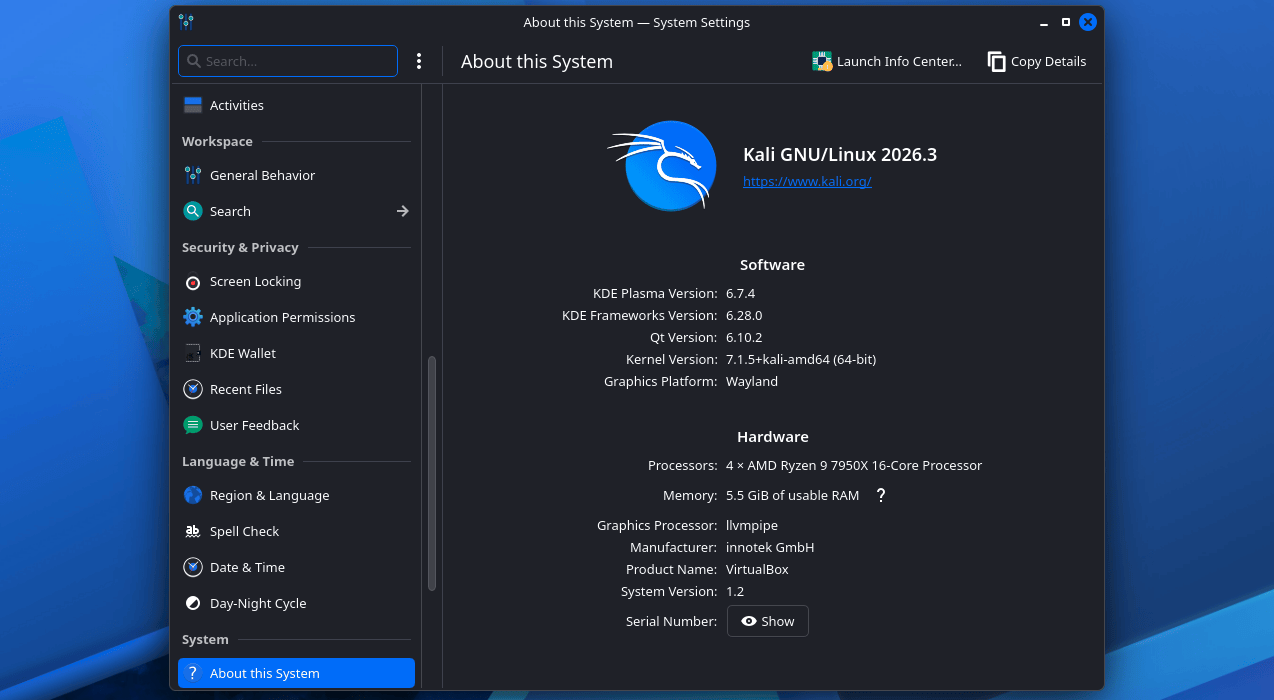
Kali Linux 2026.3 is out. Released on October 26, 2026, it is the third Kali release of the year, and it ships with six new hacking tools, a major KDE Plasma upgrade, a newer kernel, and refreshed build scripts that finally make building Kali images inside Docker or Podman a first-class option.
This post breaks down every new tool in Kali Linux 2026.3, what changed on the desktop, and how to upgrade your existing installation safely.
What Is New in Kali Linux 2026.3 at a Glance
- 6 new tools, including dalfox, katana, rustscan and snaffler-ng
- 126 packages updated plus new libraries across the archive
- Kernel upgrade from Linux 6.19 to 7.1.5
- KDE Plasma 6.7 with performance work, per-screen virtual desktops and new icons
- Refreshed build scripts with Docker and Podman container build support
Kali Linux is available as an installable operating system or as a live environment, and it runs on a wide range of hardware including Raspberry Pi devices and Android phones through Kali NetHunter. It is built for ethical hackers and cybersecurity professionals doing red teaming, penetration testing, security assessments, and network research.
The 6 New Tools in Kali Linux 2026.3
Each Kali release adds tools that the team sees in active use, and this batch leans heavily into web testing, recon and internal network work.
- dalfox is a powerful open-source XSS scanner and utility focused on automation. It is already a favourite for people doing parameter analysis and blind XSS hunting at scale
- katana is a next-generation crawling and spidering framework built for modern web applications, with support for standard and headless crawling modes
- qsreplace takes URLs on stdin and replaces every query string value with a value you supply. It is a small tool that saves a lot of time when you are mutating parameters across thousands of URLs
- rustscan is a modern port scanner written in Rust, known for finding open ports fast and then handing results to Nmap for deeper service analysis
- sdrangel is a Qt-based software defined radio front-end that works with a variety of SDR devices, useful for radio and signal research
- snaffler-ng scans SMB shares for credentials and sensitive data, a big help during internal network assessments
If you are upgrading from an older Kali, dalfox and katana will probably be the two tools you reach for first. Both replace manual steps in web application testing workflows.
KDE Plasma 6.7 Desktop Updates
The flagship desktop gets KDE Plasma 6.7, and Kali users who live in the GUI will notice the changes immediately.
- Performance and power: KDE Plasma 6.7 includes general performance improvements and better power usage on Intel GPUs
- Per-screen virtual desktops: you can now set up separate workspaces on the same desktop for a browser, terminals and documentation, which maps nicely onto how pentesters arrange their screens
- Faster desktop switching: moving around virtual desktops is quicker from the Overview
- Wayland progress: support for additional Wayland protocols and portals keeps improving the experience on modern Linux setups
- Network connections can be duplicated: handy when you work with several similar network configurations
- System Monitor refinements and a set of new icons round out the visual refresh
Build Scripts Refresh With Docker and Podman Support
For people who build their own Kali images, this release is the big one. The Kali team brought consistency to its build scripts across platforms, so each one now has the same features, command-line arguments, structure and layout where possible, and the same look and feel.
Each refreshed script now comes with a build-in-container.sh helper that detects which container engine you have, creates the build container, and runs the build from inside it. Both Docker and Podman are supported.
Not every build script was refreshed before 2026.3 shipped. The team says it aims to have them all ready for Kali 2026.4, with automating builds and workflows as the next stage.
Kernel and Packages
Kali 2026.3 upgrades the kernel from 6.19 to 7.1.5 and updates 126 packages across the archive, along with new libraries. For most users this shows up as better hardware support, including newer Wi-Fi chipsets and devices, plus the usual round of tool fixes.
How to Get Kali Linux 2026.3
You have three options:
- Upgrade your existing installation. This is the path most people should take:
sudo apt update
sudo apt full-upgrade -y
Then reboot and confirm your version with cat /etc/os-release.
- Download a fresh image. Kali’s download page offers installer images, live images, virtual machine images, ARM builds for Raspberry Pi, and mobile builds for Kali NetHunter on Android
- Build it yourself. With the refreshed build scripts, you can now generate custom Kali images inside a Docker or Podman container
Tips Before You Upgrade
- Export your notes and any custom wordlists or scripts from
/usr/sharebefore a major upgrade, in case a package rename affects your paths - If you use a custom kernel module or a third-party Wi-Fi driver, check compatibility with kernel 7.1.5 before rebooting into it
- Run the upgrade over a wired connection if possible, since network drivers can change between kernel versions
- Test dalfox and katana against a lab target first to learn their flags, rather than during a live engagement
- Container users: try build-in-container.sh for a reproducible build environment instead of installing build dependencies on your host
FAQ
What is new in Kali Linux 2026.3?
Kali Linux 2026.3 adds six new tools (dalfox, katana, qsreplace, rustscan, sdrangel and snaffler-ng), updates 126 packages, upgrades the kernel from 6.19 to 7.1.5, ships KDE Plasma 6.7, and refreshes the build scripts with Docker and Podman support.
How do I upgrade to Kali Linux 2026.3?
Run sudo apt update followed by sudo apt full-upgrade -y, then reboot. Verify the new version with cat /etc/os-release. Fresh ISO and VM images are also available from the official Kali download page.
Which new hacking tools are included in Kali 2026.3?
dalfox for XSS scanning, katana for web crawling, qsreplace for query string mutation, rustscan for fast port scanning, sdrangel for software defined radio, and snaffler-ng for finding credentials on SMB shares.
Does Kali Linux 2026.3 support KDE Plasma 6.7?
Yes. KDE Plasma 6.7 is the default desktop upgrade in this release, bringing per-screen virtual desktops, Intel GPU power improvements, faster Overview navigation, and better Wayland support.
Can I build Kali images with Docker now?
Yes. The refreshed build scripts include a build-in-container.sh helper that works with both Docker and Podman. It detects your container engine, creates the build container, and runs the build inside it.
