



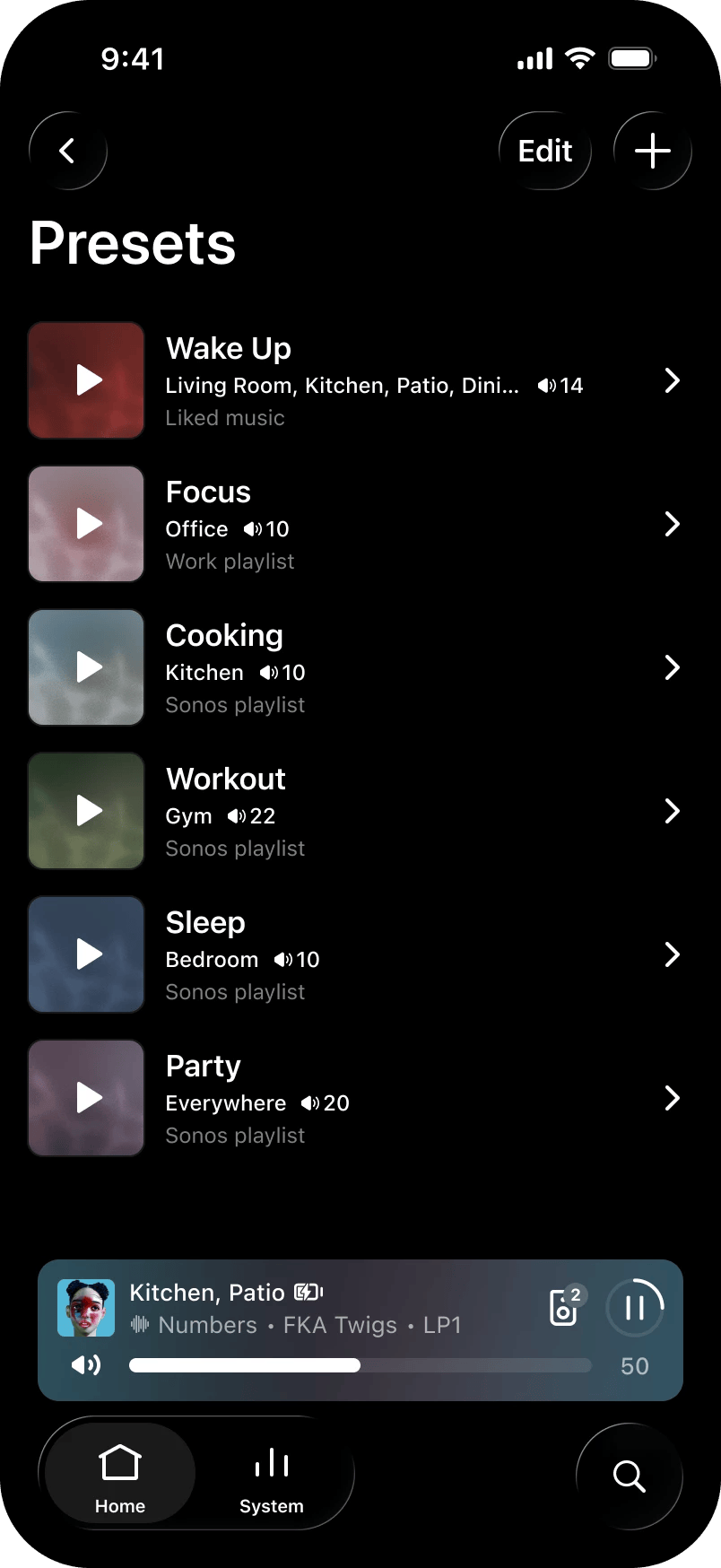
Sonos users have asked for one-tap playback for years, and it has finally arrived. The Sonos 27.3 app update, now rolling out for iOS and Android, adds Presets that start music in a chosen room at a set volume with a single tap. The same update also brings early access signups for Sonos 27voice, the company’s AI voice assistant. Here is everything new in the Sonos app update and how to get it.
Presets Arrive in Sonos 27.3
Presets are the headline feature, and the idea is simple. You save a piece of content, a room and a volume level together, and the preset appears directly on the app home screen. One tap starts playback exactly how you want it, with no scrolling through rooms or adjusting sliders.
- One-tap playback: Start pre-saved content in a chosen room at a specific volume instantly
- Home screen access: Presets sit right on the homescreen for quick use
- Everyday routines: Sonos suggests use cases like a morning routine or a go-to party setup
Sonos staff announced the feature in the company’s community forum on 3 November, calling it “an often requested feature.” The support documentation for Presets is already live on the Sonos support site for anyone setting up their first one.

Everything Else New in the Sonos App Update
Presets are not the only change. The Sonos 27.3 update, app version 91.00.41 on iOS and 91.00.33 on Android, brings a batch of smaller improvements that fix long-standing complaints:
- Reorder your favourites: You can now arrange saved content in your preferred order by editing the Featured section in Sonos Favorites
- Swipe to skip: Swipe on the Now Playing screen or the mini player to skip tracks
- Spotify volume fix: Spotify volume levels now behave consistently with other services, whether you control playback from the Sonos app or directly from Spotify
- Better network updates: Improvements to the experience when updating your system’s network settings
Some features are platform-specific. iOS users get System Health, a new self-help feature in the Help Center that spots potential issues and suggests fixes for your system. Android users can now rearrange the list of connected music services. Sonos Ace Ultra headphones also pick up firmware 3.0.10 with Ace Vocal Guidance, spoken prompts when you change noise control modes, check battery percentage or switch Bluetooth connections, toggled under Headphones, then Settings, then Hardware controls.
Why This Update Matters for Sonos
Sonos spent much of 2024 apologising for its app. The ground-up redesign that year shipped without basic features, and the backlash forced the company into a long, public rebuilding effort. The Sonos 27 updates are the visible result: every release since has focused on restoring lost functionality and adding the small conveniences users actually ask for.
Presets fit that pattern perfectly. They are not flashy, but they remove friction from the thing people do most with a speaker system, which is starting music in the room they are sitting in. After two years of being told what went wrong, Sonos is shipping updates that are easy to explain in one sentence, and that is usually a sign the product team has its priorities straight.
Sonos 27voice AI Assistant: Early Access Details
The bigger strategic move in this update is 27voice, Sonos’ own AI voice assistant. It becomes available starting Fall 2026 and supports US English at launch. US users can opt in to try it during early access and share feedback before the wider release.
- Waitlist opens: 6 November in the United States, according to The Verge
- Early access starts: 12 November for users who sign up
- Language: US English only at launch
- Signups: Handled through the Sonos app, with more details promised soon
For Sonos, 27voice is the answer to a difficult year. After the app redesign backlash of 2024, the company has spent 2025 and 2026 rebuilding trust with steady, useful updates. An AI assistant that actually controls your speakers well would be the strongest argument yet for staying in the ecosystem.
How to Get the Update and Set Up Presets
- Check for the update. Sonos rolls releases out over several days or weeks. Open the App Store or Google Play Store and pull to refresh on the Sonos listing to pull the update sooner.
- Update your speakers. The player update (98.0-82170 for modern speakers, 86.11-82170 for legacy) installs through the app once the phone app is current.
- Create your first preset. Open Sonos Favorites, save a playlist or station with a room and volume, then pin it to the home screen. Sonos has a setup guide on its support site.
- Join the 27voice waitlist. From 6 November, US users can sign up in the app for early access starting 12 November.
One practical tip: build presets around moments, not rooms. A preset named “Morning News” that starts a podcast in the kitchen at 30 percent volume saves more steps than one named “Kitchen Speaker.” The one-tap promise only pays off when the preset matches something you do every day.
A second tip for multi-room homes: create one preset per daily moment rather than one per room. A good starter set is a morning preset, a work-from-home background preset and an evening preset at low volume. Once those are on the home screen, most people stop opening the full app entirely during the week.
If the update does not show up straight away, do not reinstall the app. Sonos rolls releases out in waves over several days or weeks, and a reinstall will not force the new version. Keep checking the store listing, update your speakers once the phone app is current, and the Presets option will appear in the app when your account is included in the rollout.
FAQ
What is new in the Sonos 27 app update?
Sonos 27.3 adds Presets for one-tap playback at a set room and volume, favourites reordering, swipe to skip, more consistent Spotify volume levels, and improved network updates. iOS gets System Health, Android gets service reordering, and early access signups open for the Sonos 27voice AI assistant.
When does the Sonos 27voice AI assistant come out?
Sonos 27voice early access starts in Fall 2026 for US English users. According to The Verge, waitlist signups open on 6 November and access begins on 12 November in the United States.
How do I use Sonos Presets?
Save content with a chosen room and volume in Sonos Favorites, and the preset appears on the app home screen. One tap starts playback exactly as saved. Sonos has a support guide covering setup, and suggests presets for routines like morning listening or party setups.
Why don’t I see the Sonos app update yet?
Sonos rolls app and player updates out over several days or weeks, so it may not reach everyone at once. Check the App Store or Google Play Store for version 91.00.41 on iOS or 91.00.33 on Android and refresh the listing to pull it sooner.
