



Close Menu
GeekPlanet

    Subscribe to Updates

    Be Geeky and subscribe to GeekPlanet for Technology, Security and Gadgets.

    What's Hot

    Android 16 Desktop Mode: New Features on Pixel and Samsung Phones

    Cyber Security Threats 2026: How Indian Users Should Protect Data

    Mobile Phones Market India August 2026: Best Phones Under Rs 30,000

    Facebook X (Twitter) Instagram
    • Privacy & Policy
    • Terms & Conditions
    • Contact US
    Facebook X (Twitter) Instagram YouTube
    GeekPlanetGeekPlanet
    AtlasVpn
    • Home
    • Gadgets
    • Entertainment
    • Cyber Security
    • How To’s & Guides
    • Reviews
    • Python
    GeekPlanet
    Home - How To's & Guides - How To Use YouTube Keyboard Shortcuts – run Youtube from keyboard
    How To's & Guides

    How To Use YouTube Keyboard Shortcuts – run Youtube from keyboard

    Geek PlanetBy Geek PlanetUpdated:October 9, 20232 Mins Read
    Facebook Twitter Pinterest LinkedIn Telegram Tumblr Email
    youtube-keyboard-shortcuts-by-geekplanet.in-2
    Share
    Facebook Twitter LinkedIn Pinterest Email

    [ad_1]

    Using touchscreen in mobile and using keyboard shortcuts in computer has its own fun. Just as a mobile phone can be operated faster by using a touch screen, similarly by using keyboard shortcuts, you can use the computer and any website very fast. Till now you must have operated YouTube on your computer with the mouse. In this post, we will know the keyboard shortcuts of YouTube so that you will be able to use it in a better way –

    Play YouTube from keyboard –youtube-keyboard-shortcuts-by-geekplanet.in
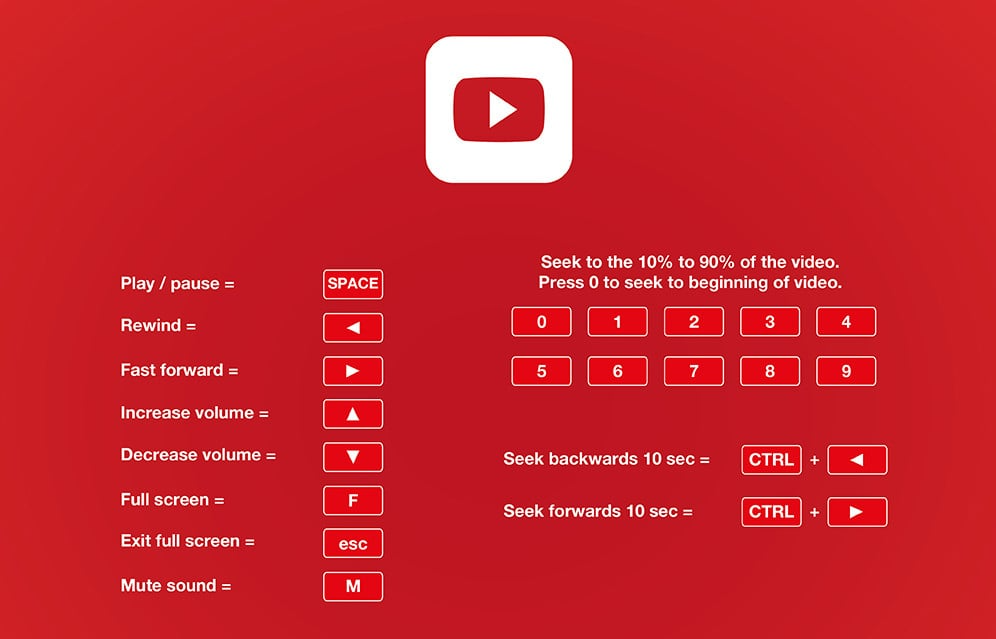
    • To play or end any video playing on YouTube, press the spacebar or press “K” on the keyboard.
    • If you want to view the video full screen then just press “F” and after pressing “F” again come back to the old position.
    • If you want to move the video forward then use “L” and if you want to go backward or rewind then use “J”. Apart from this you can also use left and right arrow keys. This can be done to move the video forward and backward by 5-5 seconds. Could.
    • If you want to move the video forward and backward by 1 minute, then press the PageUp and PageDown buttons of the keyboard.
    • If you have watched a video for 15-20 minutes and want to watch it from the beginning again, just press “0” zero from the keyboard. Apart from this, you can also do this by pressing the Home button.
    • To increase or decrease the volume or volume, use the Up and Down arrow keys just like a TV remote and if you want to mute it, just press “M”.
    Share. Facebook Twitter Pinterest LinkedIn Tumblr Email
    Geek Planet
    • Website
    • Facebook
    • X (Twitter)
    • Instagram

    Hello, tech enthusiasts! I'm Devender, your guide through the ever-evolving world of technology. With a passion for innovation and a knack for breaking down complex concepts into digestible bits, I'm here to help you navigate the digital frontier.

    Related Posts

    AI Coding Tools Are Reshaping Developer Jobs in 2026

    84% of Developers Use AI Coding Tools Daily, But Productivity Gains Stay at 10%

    Stop Meta From Using Your Instagram Photos for AI: How to Opt Out

    Claude Code Artifacts Turns AI Coding Sessions Into Live Shareable Pages

    Deploying your own personal AI agent with OpenClaw

    How to Create Whatsapp Channel – Understand Step by Step

    Leave A Reply Cancel Reply

    Top Posts

    Android 16 Desktop Mode: New Features on Pixel and Samsung Phones

    Data Structures and Their Functions in Python

    How do I edit a sent message on WhatsApp?

    Don't Miss

    Android 16 Desktop Mode: New Features on Pixel and Samsung Phones

    Android 16 Desktop Mode updates and what Indian users need to know in August 2026.

    Cyber Security Threats 2026: How Indian Users Should Protect Data

    Mobile Phones Market India August 2026: Best Phones Under Rs 30,000

    SEO Strategies 2026: How Indian Websites Can Rank After Google Updates

    Stay In Touch
    • Facebook
    • YouTube
    • TikTok
    • WhatsApp
    • Twitter
    • Instagram
    TPS4
    Most Popular

    Android 16 Desktop Mode: New Features on Pixel and Samsung Phones

    Data Structures and Their Functions in Python

    How do I edit a sent message on WhatsApp?

    Our Picks

    Android 16 Desktop Mode: New Features on Pixel and Samsung Phones

    Cyber Security Threats 2026: How Indian Users Should Protect Data

    Mobile Phones Market India August 2026: Best Phones Under Rs 30,000

    Subscribe to Updates

    Be Geeky and subscribe to GeekPlanet for Technology, Security and Gadgets.

    Facebook X (Twitter) Instagram Pinterest
    © 2026 GeekPlanet.in Managed by MyAdsMantra Global.

    Type above and press Enter to search. Press Esc to cancel.

    Ad Blocker Enabled!
    Ad Blocker Enabled!
    GeekPlanet is a safe place for every tech lover and is made possible by displaying online advertisements to our visitors. Please support us by disabling your Ad Blocker.