



Google Messages has been teasing a new look for pinned chats since August, and it is finally reaching real users. The redesign brings large contact photos and an iMessage-style layout to the top of your conversations. Google is also testing a new Search button that drops the Gemini icon, a change many users have wanted for months. Here is what is new and how to get the updated Google Messages UI.
What’s New in the Pinned Chats Redesign
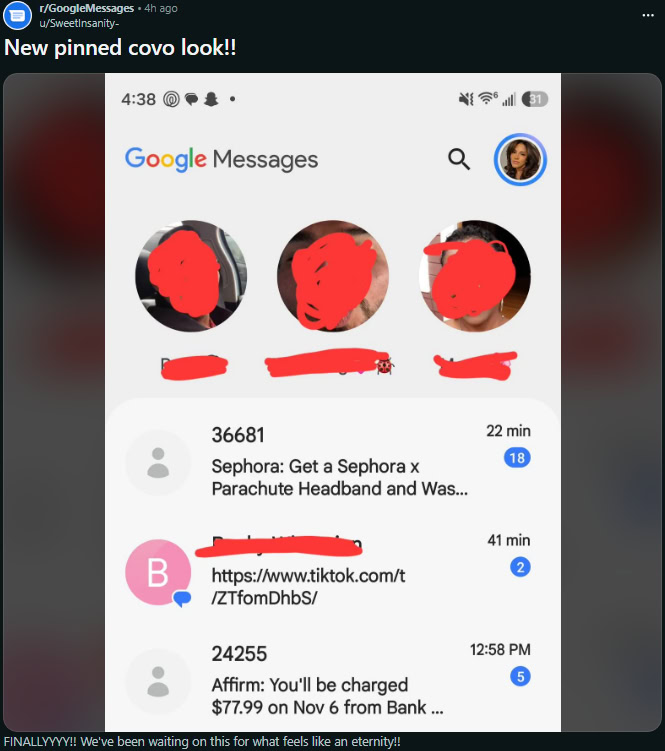
The pinned conversations section at the top of Google Messages is getting its biggest visual change in years. Instead of small, cramped thumbnails, pinned chats now show large contact photos that stand out clearly, giving the app a layout that feels closer to iMessage.
Android Authority first enabled the redesign manually back in August, but it is now rolling out to beta users on its own. Several users on the r/GoogleMessages subreddit have confirmed seeing the new UI, including one on version 20261030_00_RC00 of the app. At the same time, other users running the exact same build report still having the old layout, which points to a server-side switch on Google’s end rather than a simple app update.
There is one open question. Android Authority spotted richer message previews inside the pinned chat icons back in September, previews that would show recent text right on the pinned contact. It is not yet clear whether those previews made it into this rollout, or whether Google is holding them back for a later update.
A New Search Button Without the Gemini Icon
The second change is smaller but arguably more welcome. At least one beta user has spotted a new floating action button (FAB) for Search on the Google Messages home screen, sitting right next to the Start Chat pill. The button appears in both an expanded and a collapsed look, and the Gemini icon is noticeably absent from it.
That absence is deliberate. A September teardown by Android Authority showed that the Gemini icon is being moved to the app header, where it will replace the existing Search icon. The result: a plain Search button where people expect it, and Gemini tucked away where it bothers fewer users. Given how Android Authority readers voted on Gemini in Google Messages as their least favourite feature, this is a quiet but meaningful fix.
Neither the pinned chats redesign nor the Search button has been officially confirmed by Google, so both could still change before reaching the stable app.
A Short History of This Redesign
The pinned chats overhaul did not appear overnight. Android Authority first got the new UI working through manual flags in August, then spotted richer message previews in September, and now the design is reaching ordinary beta users in November. That three-month gap is typical for Google UI work: features get built, tested internally, tweaked based on teardown feedback, and then switched on gradually.
The fact that the design survived that process unchanged is a good sign. The large contact photos and cleaner layout were the parts users responded well to in the first reports, and those are exactly what shipped. If you have been waiting for Google Messages to look less cluttered at the top, this is the update that does it.
How to Get the New Google Messages UI
- Join the beta programme. Open the Google Messages listing on the Play Store, scroll to the join beta section, and sign up. Slots open and close, so try again if it says the programme is full.
- Update to the latest beta build. The redesign is confirmed on build 20261030_00_RC00 and newer.
- Wait for the server-side switch. Installing the beta does not guarantee the new UI. Google enables it per account or device, so it can take days or weeks to reach you.
- Keep the app updated. Check the Play Store regularly, since follow-up builds may widen the rollout.
If you are on the stable channel, the safest option is to wait. Google normally brings confirmed beta designs to the stable app within a few months, and the pinned chats redesign looks close to finished.
What This Means for Google Messages
These two changes point to a clear direction. Google is cleaning up the home screen, making conversations the visual focus again, and pulling Gemini out of the most prominent spot. For a messaging app that has picked up a lot of features in the last two years, trimming the interface matters as much as adding to it.
For anyone who pins family chats or work groups, the large contact photos make finding the right conversation faster at a glance. And for everyone who has tapped Search only to open Gemini by accident, the relocated icon removes a daily annoyance.
There is a broader point here about where Google Messages is heading. The app has spent two years absorbing RCS upgrades, scheduling, magic replies and Gemini features, and the home screen got crowded in the process. Making pinned chats visually dominant again and pushing AI to the margins is the kind of housekeeping that decides whether people keep the app as their default. If the stable rollout goes smoothly, most users will just notice that the app feels easier to use without being able to say exactly why.
One thing to watch: the richer message previews spotted in September. If those arrive alongside the redesign, pinned chats will show recent message text inside the contact icons, which would make the top row genuinely useful instead of just decorative. Google appears to be shipping the pieces in order, so a follow-up update in the coming weeks is the likeliest place for that feature to land.
FAQ
How do I get the new Google Messages pinned chats design?
Join the Google Messages beta programme from the Play Store and update to build 20261030_00_RC00 or newer. The redesign is enabled by a server-side switch, so it may take days or weeks to appear even after you install the beta.
Why don’t I see the new pinned chats UI on the beta?
Google is rolling the redesign out gradually through a server-side switch. Some users on the latest beta build still have the old layout, which is normal. Keep the app updated and wait for the rollout to reach your account.
Is Gemini being removed from Google Messages?
No, but it is being moved. The Gemini icon is leaving the floating Search button and heading to the app header, where it will replace the current Search icon, according to an Android Authority teardown.
When will the new Google Messages UI reach the stable app?
Google has not confirmed a timeline. Beta features that reach this stage of rollout typically arrive in the stable app within a few months, but no date is announced yet.
