



Android 17 QPR2 is here. Google shipped the stable release on 10 November 2026 alongside the November Pixel updates, and it is one of the bigger quarterly drops in recent memory. The update touches everything from the status bar to Bluetooth audio, and most of it improves daily use rather than adding flashy gimmicks.
Below is the full list of what is new, grouped so you can find what matters to you.
Which Devices Get Android 17 QPR2
QPR2 is rolling out to supported Pixel phones over the coming week, starting with the devices that are part of the November Pixel Drop. If you own a Pixel that already runs Android 17, you will see it in Settings, then System, then Software updates.
Other manufacturers follow their own schedules. Based on past cycles, Samsung, OnePlus and others usually pick up the quarterly releases one to three months after Pixels. Nothing OS and other close-to-stock builds tend to move fastest.
Custom Colours, Blur Effects and UI Tuning
The most visible changes are in theming and animations:
- System colour palettes: you can now pick the intensity of the colour effect and preview the change before applying it. Adaptive wallpapers get light and dark mode variants.
- New blur effects for apps: developers can use blur overlays that work properly with media content behind them.
- Lock screen widget editing: a new interface for rearranging widgets directly on the lock screen.
- Power menu and home screen: improved blur on the power menu and smarter menus when you long-press the home screen.
Status Bar, Quick Settings and Notifications
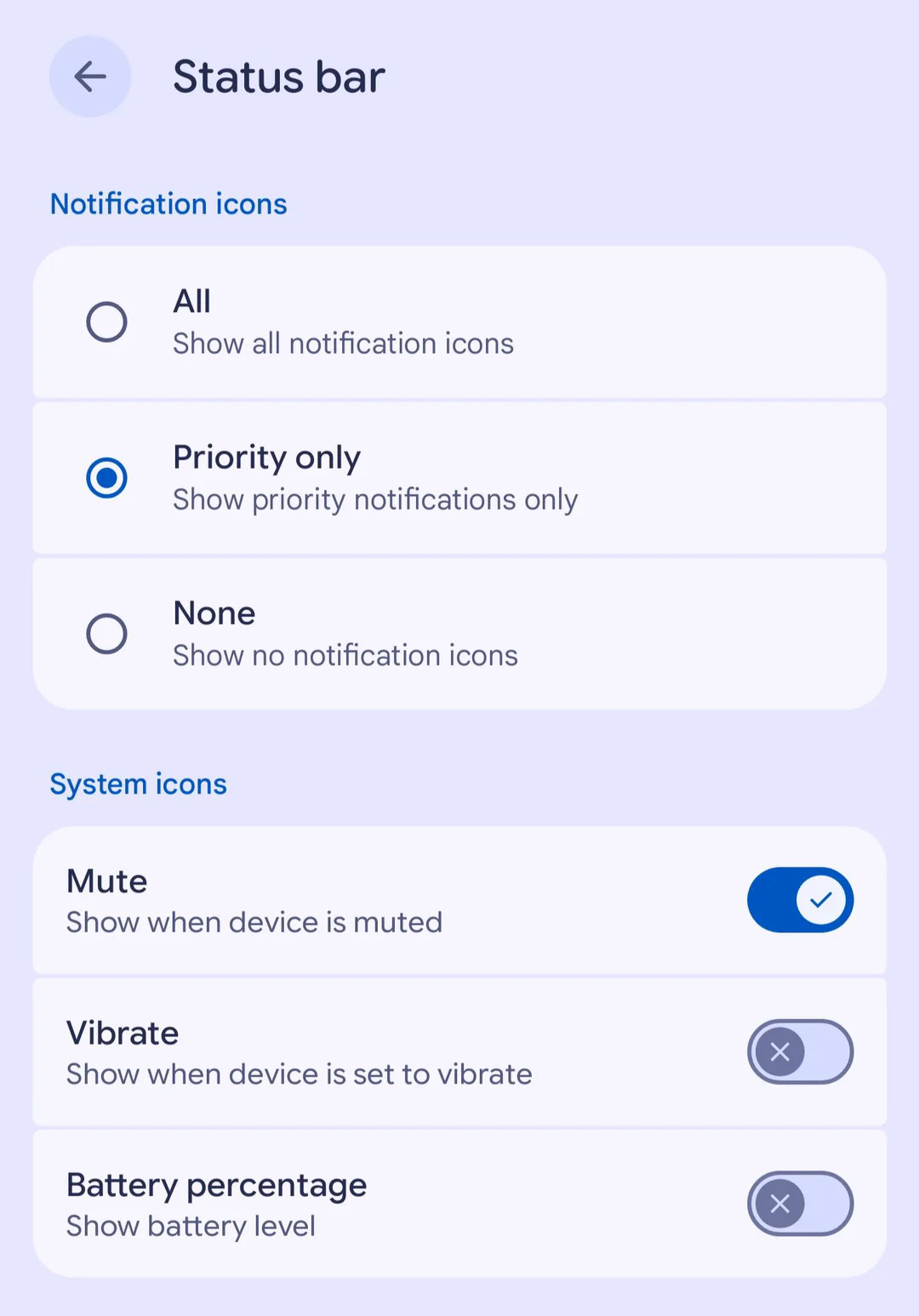
Status bar customisation finally goes mainstream in QPR2. You can choose which notification types appear as icons and toggle system mode indicators. Anyone who keeps a clean status bar will appreciate this.
Quick Settings gets several practical additions:
- Brightness override: apps can no longer stop you from adjusting screen brightness while they are open.
- Keyboard switcher: swap keyboards from the Quick Settings panel.
- Audio streams control: manage connected audio outputs in one place.
- Always-On Display improvements: better icon rendering on the AOD.
- Live Updates for printing: document print jobs now show live progress, the same style used for deliveries and rides.
Bluetooth: Voice Broadcast Arrives
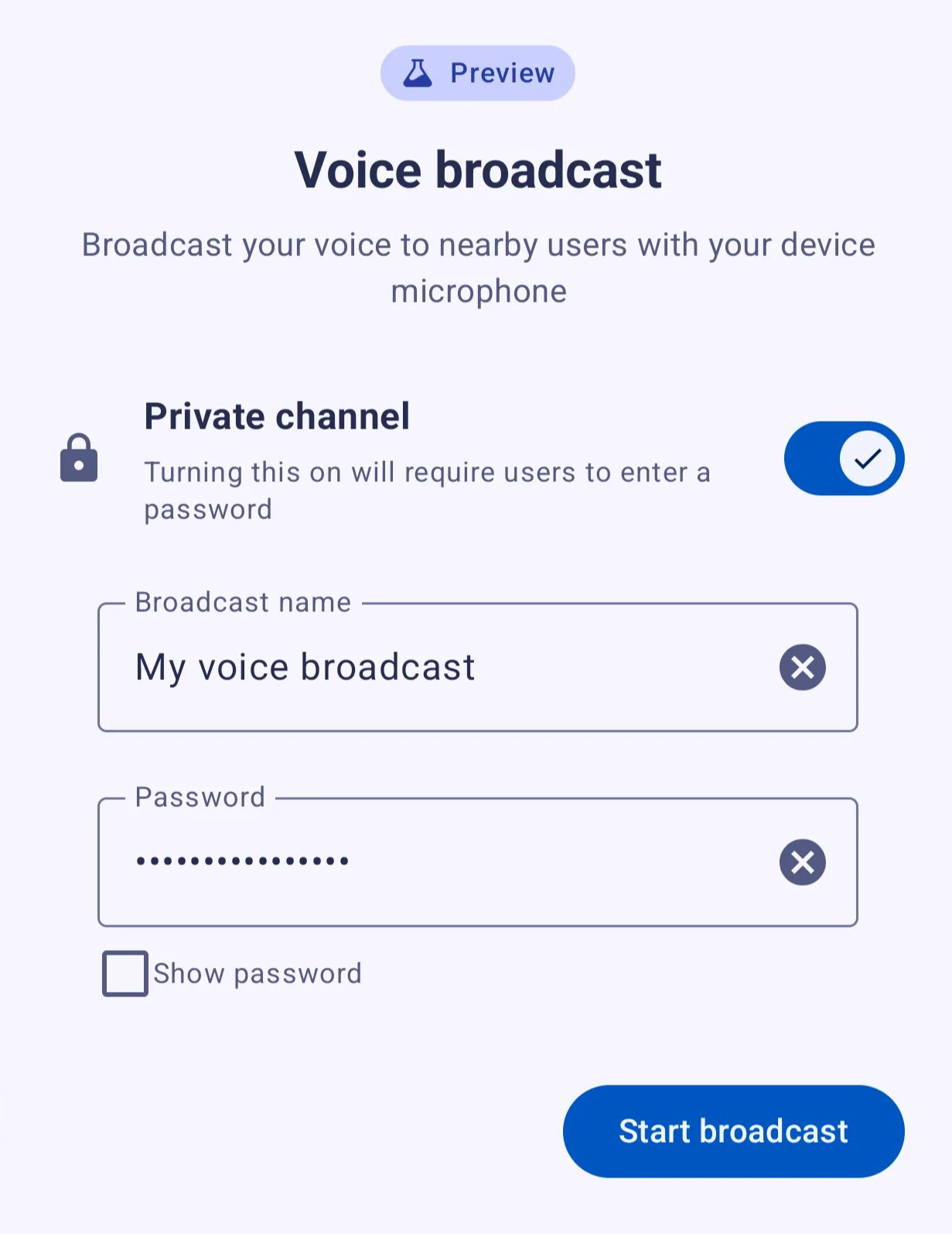
If you have envied Samsung’s Audio Broadcast feature, this one is for you. Voice broadcast (previously seen in beta builds as Voicecast) lets you stream your voice directly to Auracast-compatible listeners. Think of it as a personal PA system for hearing aids, earbuds and shared headsets.
It pairs well with Live Caption and Translation, which can run alongside the broadcast. Quick Settings includes a dedicated audio streams tile to manage it.
Sideloading Gets a Cleaner Permission Flow
Android 17 QPR2 implements a refreshed workflow for sideloading APKs. Instead of bouncing through multiple screens to grant install permissions, the process now presents the required permission prompts in one guided flow. It keeps the security checks intact while removing the friction that pushes people toward risky “install from unknown sources” workarounds.
Accessibility and Travel Tweaks
- Colour correction fixes: several bugs affecting colour perception settings are resolved.
- Bluetooth hearing aids: new lock screen controls and persistent notification controls while connected.
- Preferred home time zone: frequent travellers can set a home time zone so clocks behave sensibly on the road.
- Keyboard vibration slider: fine control over haptic intensity while typing.
The November Pixel Drop Rolls Out With It
QPR2 ships alongside Google’s November Pixel Drop, the feature bundle that expands across Pixel devices this month. The headliner is Step-by-step Workouts on Pixel Watch 3, Pixel Watch 4 and Pixel Watch 5. You can follow strength training, mixed workouts and Coach sessions on your wrist with or without your phone, and edit weights and reps mid-workout. Building custom workouts with the Google Health Coach requires a Google Health Premium subscription.
The Pixel Drop features arrive over the same one-week window as the system update, so a watch or phone may pick up new capabilities a day or two after the main OS lands.
What Comes Next: QPR3
Google has already opened the QPR3 beta, and based on the usual rhythm it should reach stable in spring 2027. QPR2 is the one to enjoy now. The update is rolling out through November, so if your Pixel has not prompted you yet, give it a few days.
Performance and Bug Fixes
Underneath the features, QPR2 carries the stability work from the November Pixel update. Users on the beta track reported fewer UI crashes around the lock screen and Quick Settings, smoother animations after the blur rework, and better memory behaviour on older Pixels. Google has not published a full public changelog of every fix, but the update is treated as a servicing release, so install it even if none of the features above appeal to you. Battery life reports from beta users have been steady, with no widespread drain complaints across the Pixel 8, Pixel 9 and Pixel 10 families.
Tips After Updating
- Check the status bar settings first. The new notification and indicator controls are buried in Display settings and are worth tuning.
- Try the new context menus. Long-press the home screen and power menu to see the refreshed layouts.
- Test brightness override in apps that previously locked your brightness, like some games and video players.
- Developers: the new blur APIs and Live Updates templates are the two features worth building against.
Frequently Asked Questions
When did Android 17 QPR2 stable release?
Google released the stable build on 10 November 2026 along with the November Pixel updates. Rollout continues over the following week.
Which phones get Android 17 QPR2 first?
Pixel devices get it first, as always. Samsung, OnePlus and other brands typically follow one to three months later with their own skins on top.
What is Voice broadcast in Android 17 QPR2?
It streams your voice over Bluetooth to Auracast-compatible devices such as hearing aids and earbuds. It works with Live Caption and Translation and is controlled from Quick Settings.
How big is the Android 17 QPR2 update?
Size varies by device and by how many monthly updates you have skipped. Pixels that are fully up to date usually see a few hundred MB, while older builds may pull a larger package.
Does Android 17 QPR2 change sideloading?
Yes. The permission flow for installing APKs is now a single guided workflow, so you grant install permissions in one pass instead of several scattered prompts.
